Every SEO guide mentions alt text. Add a description to your images for accessibility. Include keywords for image search. Check the box, move on.
But here’s what those guides don’t tell you: LLMs read your alt text. Not to find images, but to understand your page. And missing alt text sends a signal you didn’t intend.
Why LLMs care about alt text
AI models don’t see images. When an LLM processes your page, every <img> tag is invisible unless it has alt text. The alt attribute is the only way a model knows an image exists and what it represents.
This matters more than you’d think, because images carry context. A product page with five product photos but no alt text looks like a page with five empty holes to an LLM. The model can read your product description, but it’s missing the visual context that makes the description complete.
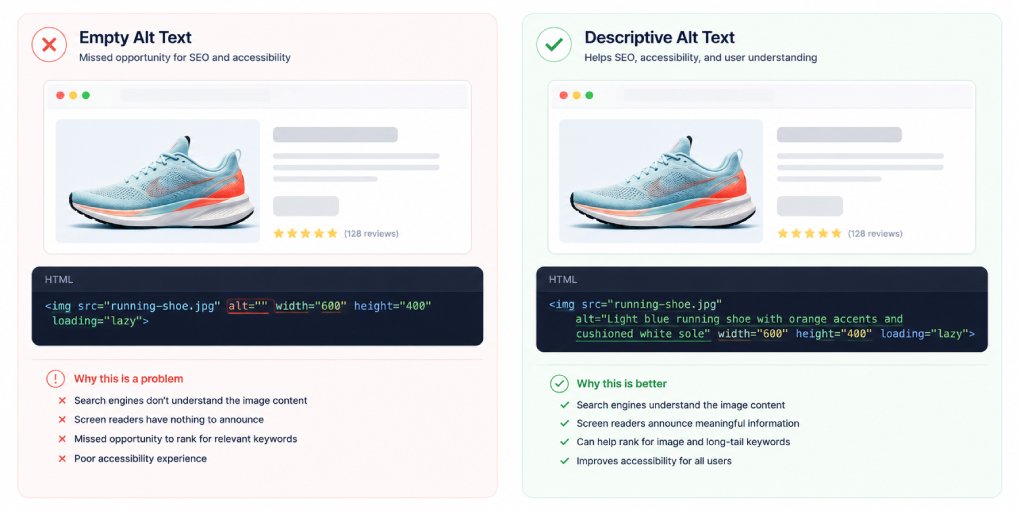
Alt text fills those holes. “Blue running shoe, side profile view” tells the model this is a product page about footwear. “Comparison chart showing pricing tiers” tells it there’s structured pricing information. “Screenshot of the dashboard analytics view” tells it the page demonstrates a software feature.
Without alt text, the model processes your page with gaps in its understanding. With it, the model gets a complete picture.
The trust signal you’re overlooking
Alt text also functions as a content quality signal. Sites that skip alt text tend to skip other quality signals too: missing schema, incomplete metadata, poor heading structure. LLMs don’t evaluate these signals individually. They evaluate patterns.
A page with ten images and zero alt text tells the model this site doesn’t invest in thorough markup. That pattern reduces confidence in the content overall, even if the text content itself is well-written.
A page with ten images and descriptive alt text on each one tells the model the opposite: this site pays attention to detail. Every element is documented. The content is likely well-maintained.
In hey-eye’s scoring system, image alt text is evaluated under the Authority & Trust pillar. It’s not the highest-weighted signal, but it’s one of the easiest to get right, and getting it wrong drags down a pillar that also includes author attribution, social profiles, and AI crawler access.
What good alt text looks like for AI
Writing alt text for AI visibility follows the same principles as writing alt text for accessibility, with one addition: context relevance.
Describe what the image shows, not what you want to rank for. “Best affordable running shoes 2026 buy now free shipping” is keyword stuffing. “Blue mesh running shoe with white sole, men’s size” is useful alt text that helps both screen readers and LLMs.
Include context that connects to the page topic. If the page is about JSON-LD schema and the image shows a code example, “JSON-LD Article schema example showing headline, author, and datePublished fields” is far more useful than “code screenshot” or “example.”
Keep it concise but specific. 10-15 words is the sweet spot. Long enough to be descriptive, short enough to be processed efficiently. Alt text over 125 characters gets truncated by some screen readers, and overly long alt text dilutes the signal for LLMs.
Skip decorative images. Icons, dividers, background patterns, and purely decorative graphics should have empty alt attributes (alt=""). This tells both screen readers and LLMs to ignore them. Adding alt text to decorative images creates noise that makes meaningful alt text harder to identify.
The most common mistakes
“Image” or “photo” as alt text. This tells the model nothing. It already knows it’s an image from the <img> tag.
Filename as alt text. “IMG_4523.jpg” or “screenshot-2026-07-14.png” is worse than no alt text because it suggests automation without human review.
Same alt text on every image. A product page where every photo has the alt text “product image” tells the model there are multiple images but gives no information about what makes them different.
Alt text on background images. CSS background images don’t have alt attributes. If important visual content is displayed via CSS backgrounds, the information is invisible to both screen readers and AI models. Move important images to <img> tags.
Missing alt entirely vs empty alt. No alt attribute at all (<img src="...">) is an error. An empty alt attribute (<img src="..." alt="">) is a deliberate decision to mark the image as decorative. LLMs and accessibility tools treat these differently.
Auditing your alt text
Before fixing anything, find out how big the problem is:
Quick browser check. Install the WAVE accessibility extension for Chrome. It highlights every image without alt text on any page. Run it on your top five pages.
hey-eye check. Run your pages through hey-eye. The Authority & Trust pillar reports whether alt text is detected on your images. A “no static images found” result means either your images are lazy-loaded via JavaScript (so the analyzer can’t see them) or your images genuinely lack alt text.
Bulk audit. If you have a CMS, most have plugins or built-in tools that list all images missing alt text across your entire site. Fix them in bulk rather than page by page.
Implementation priority
You don’t need to alt-text every image on your site today. Start with:
- Product images. These directly affect AI shopping agent comprehension and comparison accuracy.
- Hero images on key pages. The first image on your most important pages sets context for the entire page.
- Charts, diagrams, and screenshots. These carry information that’s completely lost without alt text.
- Blog post images. Each article’s featured image and inline images.
Skip decorative images, icons, and spacers. Mark them with empty alt attributes and move on.
The 5-minute fix
Alt text is one of the rare SEO signals where the fix is genuinely simple. Open your page editor, find each <img> tag, write a 10-15 word description of what the image shows, and save. No technical knowledge required. No tools needed. No waiting for results.
Run your pages through hey-eye before and after to see the Authority & Trust score change. The improvement is usually immediate and visible.
Your images are already on the page. They’re already loading. They’re already using bandwidth. Make them work for your AI visibility too.