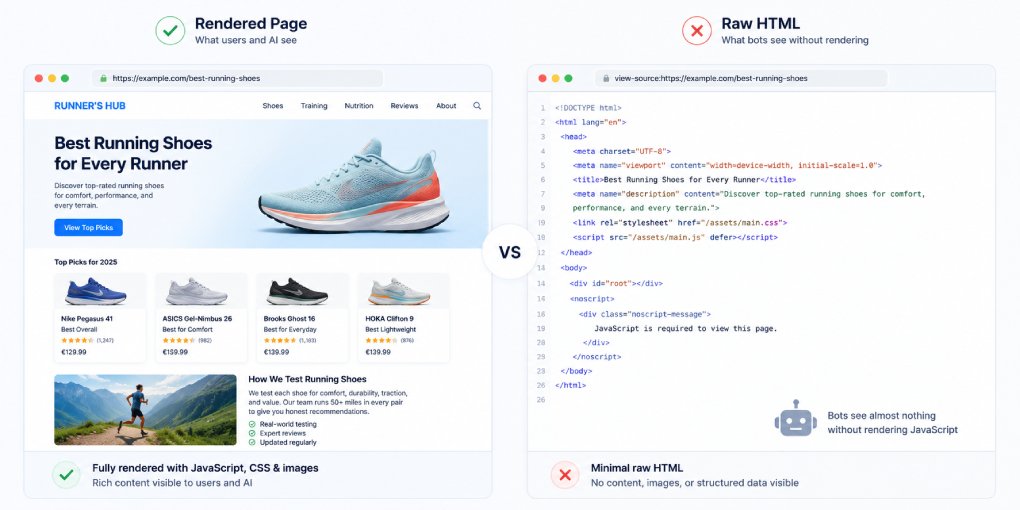
Open your website. Right-click. View Source. What you see is what most AI crawlers see. If your main content, product information, or key data only appears after JavaScript executes, you have a problem that no amount of schema or structural optimization can fix.
The content simply doesn’t exist for AI systems that can’t run your code.
The rendering gap
When a human visits your page, their browser downloads the HTML, executes JavaScript, fetches data from APIs, and renders the final page. The entire process takes 1-3 seconds and happens invisibly. The user sees the finished product.
When an AI crawler visits, it downloads the HTML and stops. Most AI crawlers don’t execute JavaScript. They parse the raw HTML response and extract whatever content exists in that initial document. If your page relies on client-side rendering to display content, the crawler sees your page’s skeleton: navigation placeholders, empty divs, loading spinners, and whatever static content was server-rendered.
This isn’t a theoretical problem. Research shows that roughly 69% of AI crawlers cannot reliably process JavaScript-rendered content. The ones that can (primarily Googlebot) do so with significant delays and resource limitations.
Which crawlers execute JavaScript
Googlebot: Yes, but with caveats. Google renders JavaScript in a “second wave” of indexing. Your page gets crawled, queued for rendering, and eventually processed. The delay between crawl and render can be hours to days. During that gap, Google only sees your server-rendered HTML.
Google-Extended (Gemini): Inherits Googlebot’s rendering capability but follows the same delayed two-wave process.
GPTBot / OAI-SearchBot: No JavaScript execution. Sees raw HTML only.
ClaudeBot: No JavaScript execution.
PerplexityBot: No JavaScript execution.
Bytespider: No JavaScript execution.
Meta-ExternalAgent: No JavaScript execution.
The pattern is clear: except for Google, no major AI crawler runs your JavaScript. If your content depends on JS, it’s invisible to ChatGPT, Claude, Perplexity, and every other AI search platform.
Common JavaScript rendering problems
Single Page Applications (SPAs). React, Vue, and Angular apps that render entirely on the client are the worst case. The initial HTML response contains only a root div and script tags. All content is injected after JavaScript runs. AI crawlers see nothing.
Dynamic content loading. Product prices, reviews, inventory status, and other data fetched from APIs after page load. The HTML contains placeholders. The actual data only appears after JavaScript makes API calls and updates the DOM.
Lazy-loaded content. Text and images that only load when the user scrolls down. AI crawlers don’t scroll. They process the initial viewport equivalent and miss everything below the fold that requires scroll-triggered JavaScript.
Runtime nav/footer injection. Navigation and footer content loaded via JavaScript fetch calls (like fetching shared HTML includes from another server). The crawler sees empty placeholder divs where your nav and footer should be, which means it misses all the internal links those elements contain.
Cookie consent overlays. Some consent implementations block page content until the user interacts with the banner. Crawlers can’t click “Accept,” so they may see only the overlay.
How to diagnose the problem
View Source test. The simplest check: visit your page, right-click, View Source. Search for your main heading, your product name, or a key paragraph. If it’s not in the source, it’s JavaScript-rendered and invisible to most AI crawlers.
Disable JavaScript test. In Chrome DevTools, press Ctrl+Shift+P, type “Disable JavaScript,” and reload your page. Whatever you see is what AI crawlers see. If the page is blank or shows only a loading spinner, you have a rendering problem.
Google’s URL Inspection tool. In Search Console, inspect a URL and click “View Tested Page” then “Screenshot.” This shows you what Googlebot sees after rendering. Compare it to the live page.
hey-eye analysis. Run your page through hey-eye. The analyzer fetches your page server-side without JavaScript execution, exactly like AI crawlers do. If hey-eye reports missing content, missing headings, or no schema, that’s what AI systems see too.
The solutions
Server-Side Rendering (SSR). Render your pages on the server before sending HTML to the browser. The initial response contains all content. Frameworks like Next.js, Nuxt, Astro, and SvelteKit support this natively. The browser still runs JavaScript for interactivity, but the content exists in the HTML from the first response.
Static Site Generation (SSG). Pre-render all pages at build time. The HTML files contain all content. No server-side processing needed at request time. Astro, Hugo, Eleventy, and other static generators produce HTML that every crawler can read. This is how the hey-eye blog works.
Hybrid rendering. Use SSR or SSG for content-heavy pages (blog posts, product pages, landing pages) and client-side rendering only for interactive features (dashboards, user accounts, real-time data). This gives crawlers readable HTML while maintaining dynamic functionality where needed.
Pre-rendering services. If rewriting your frontend isn’t feasible, services like Prerender.io detect crawler user-agents and serve a pre-rendered HTML snapshot instead of the JavaScript-dependent version. It’s a workaround, not a solution, but it can bridge the gap while you migrate.
Progressive enhancement. Build the content layer in HTML first, then enhance with JavaScript. The base page works without JS. JavaScript adds interactivity, animations, and dynamic features on top. This is the most resilient approach because it works for every crawler, every browser, and every network condition.
The JSON-LD exception
There is one important exception: JSON-LD schema in the page head is always readable, even if the rest of the page requires JavaScript. If your content is client-rendered but your schema is server-rendered in the head, AI crawlers can at least read your structured metadata.
This isn’t a substitute for server-rendered content, but it’s a useful safety net. At minimum, make sure your schema block is in the static HTML, not dynamically injected.
Check your pages now
The fastest way to find out if JavaScript rendering is hurting your AI visibility:
- Run your key pages through hey-eye and check if the scores reflect your actual content
- Disable JavaScript in your browser and reload each page
- If either test reveals missing content, prioritize server-rendering for those pages
A page that scores 90 in Lighthouse but 30 in hey-eye likely has a JavaScript rendering problem. Lighthouse renders JavaScript before scoring. AI crawlers don’t.
The fix might be a framework migration, a rendering strategy change, or simply moving critical content from JavaScript templates into static HTML. Whatever the path, the goal is the same: every piece of content that matters should exist in the initial HTML response, before a single line of JavaScript runs.