A human shopper visits your product page, scrolls past the hero image, reads the description, checks the price, and maybe looks at a few reviews before deciding. The whole process takes a couple of minutes.
An AI shopping agent does the same thing in milliseconds. But it doesn’t scroll, read, or look at images. It reads your Product schema. If you don’t have one, the agent has to scrape your visual layout and guess. Most agents won’t bother. They’ll move to a competitor whose data is structured.
What happens when an agent visits your product page
The sequence is fast and deterministic:
Step 1: robots.txt check. Can the agent access the page? If blocked, the interaction ends before it starts.
Step 2: HTTP response. The agent fetches the page and receives HTML. It doesn’t render the page visually. It parses the raw markup.
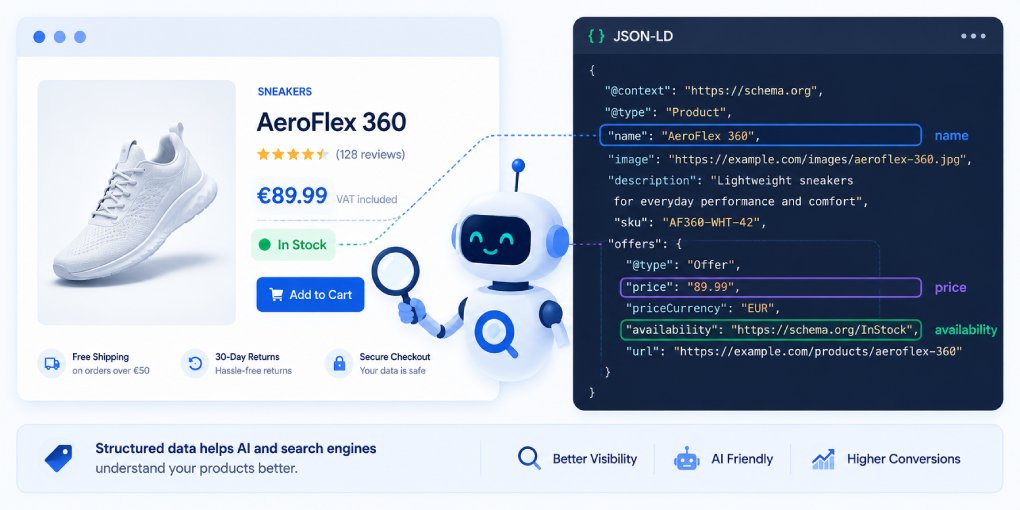
Step 3: Schema extraction. The agent looks for <script type="application/ld+json"> blocks in the HTML head. If it finds Product schema, it has everything it needs: name, price, currency, availability, description, reviews, images. Structured, typed, unambiguous.
Step 4: Decision or fallback. If schema exists, the agent extracts the data and moves on. If schema is missing, the agent falls back to parsing the visual layout: looking for price patterns in the text, guessing which element is the product name, trying to identify availability from button labels. This fallback is slow, unreliable, and often produces errors.
The entire process happens in under a second. Agents that use schema extraction can compare 50 products across 50 sites in the time it takes a human to open a single product page.
What agents extract from Product schema
A complete Product schema gives agents everything they need in one structured block:
name - The product name. Agents use this for matching when comparing across sites. An inconsistent or missing name means the agent can’t reliably match your product with the same product elsewhere.
description - What the product is. Agents use this to verify relevance when a user asks for a specific type of product.
offers.price and offers.priceCurrency - The exact price and currency. This is the field agents care about most for comparison shopping. A missing price in schema means the agent has to find it in the HTML, which is error-prone.
offers.availability - Whether the product is in stock. Agents filter out unavailable products immediately. Without this field, the agent has to guess from visual cues like button text.
aggregateRating - Star rating and review count. Agents use this as a quality signal when ranking multiple options for the user.
image - Product image URLs. Agents that present visual results to users pull images directly from schema rather than trying to identify the correct image from page layout.
brand - The manufacturer or brand name. Essential for queries like “best Nike running shoes” where brand filtering is part of the user’s intent.
sku and gtin - Unique product identifiers. These allow agents to match your exact product with listings on other sites, which is critical for accurate price comparison.
The minimum viable Product schema
If you’re starting from zero, this is the minimum that makes your products agent-readable:
{
  "@context": "https://schema.org",
  "@type": "Product",
  "name": "Your Product Name",
  "description": "A concise description of the product.",
  "image": "https://yoursite.com/images/product.jpg",
  "brand": {
    "@type": "Brand",
    "name": "Brand Name"
  },
  "offers": {
    "@type": "Offer",
    "price": "49.99",
    "priceCurrency": "USD",
    "availability": "https://schema.org/InStock",
    "url": "https://yoursite.com/product/"
  }
}
This covers the essential fields agents need for discovery and comparison. Add aggregateRating, sku, and gtin as you have the data available.
Common mistakes that break agent parsing
Price in the wrong format. Schema expects price as a number string (“49.99”), not a formatted string (“$49.99”) or a range (“49.99 - 79.99”). Agents that encounter formatted prices may misparse them or skip the product entirely.
Missing availability. If you don’t specify availability, agents can’t filter in-stock products. Your product might get presented to a user as available when it’s actually sold out, leading to a bad experience that reduces your site’s trust score.
Generic descriptions. A description that says “Great product, buy now!” gives agents nothing to work with. Descriptions should include what the product is, what it does, and who it’s for. This helps agents match it to specific user queries.
Stale prices. If your schema shows one price but the page shows another, agents lose trust in your structured data. Some agents will flag the discrepancy and deprioritize your listing. Keep schema and page content synchronized.
Multiple conflicting Product schemas. Some CMS plugins auto-generate Product schema while theme templates add their own. Two Product schemas on one page with different prices or names create ambiguity that agents can’t resolve.
Beyond Product: supporting schemas
Product schema doesn’t exist in isolation. Agents also look for:
BreadcrumbList tells agents where the product sits in your site hierarchy (Home > Category > Subcategory > Product). This helps agents understand product categorization.
FAQPage on product pages answers common questions about the product. Agents extract these Q&A pairs directly when users ask specific questions about the product.
Review (individual reviews, not just aggregateRating) gives agents detailed social proof to present alongside product information.
Test your schema
After implementing Product schema, verify it works:
- Use Google’s Rich Results Test to check for syntax errors and missing required fields.
- Run the page through hey-eye to check the AI Extractability pillar. It reports whether JSON-LD schema is present and whether the page structure supports clean extraction.
- Ask ChatGPT or Claude about your product by name. If the response includes accurate price and availability information, your schema is being read correctly.
The competitive advantage
Most e-commerce sites have some Product schema, often auto-generated by their CMS. But most of it is incomplete: missing availability, no reviews, generic descriptions, outdated prices. The bar for “better than average” is low.
A site with complete, accurate, consistently maintained Product schema stands out to AI shopping agents. It gets compared first, presented first, and recommended first. The agents are already shopping. The question is whether they’re shopping at your store.