OpenAI doesn’t use one bot. It uses three. And if you’re treating them as one, you’re probably making the wrong decisions about which to allow and which to block. The bot that matters most for visibility is OAI-SearchBot, and most sites have never heard of it.
The three OpenAI crawlers
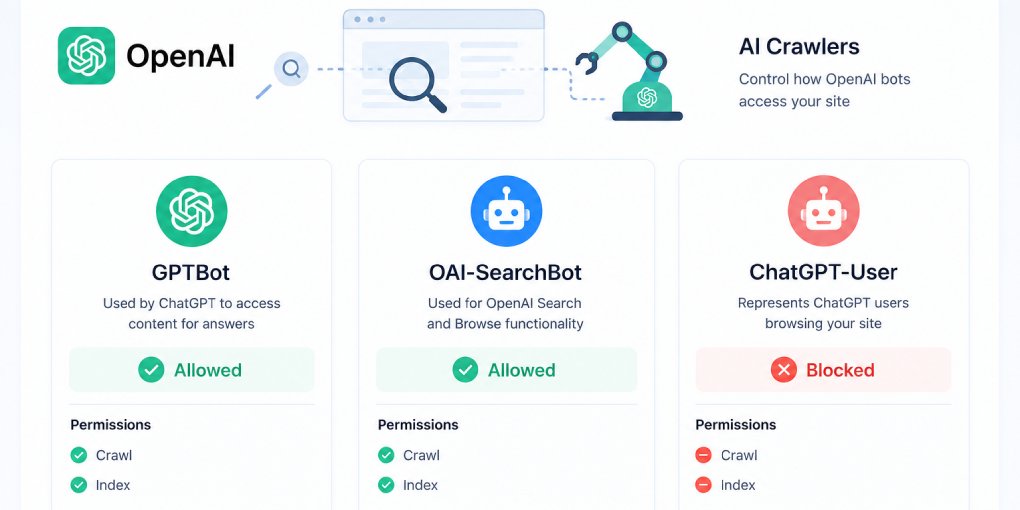
OpenAI operates three distinct crawlers, each with a separate purpose and independently controllable via robots.txt:
GPTBot crawls content that may be used to train OpenAI’s foundation models. This is the one that makes publishers nervous. Blocking it opts you out of training data collection. It has nothing to do with search visibility.
OAI-SearchBot crawls and indexes content specifically for ChatGPT Search results. When someone asks ChatGPT a question and it searches the web, OAI-SearchBot is what built the index it retrieves from. Blocking this bot removes your site from ChatGPT Search entirely.
ChatGPT-User activates only when a user explicitly asks ChatGPT to visit a specific URL. It doesn’t run automated crawls. It’s a direct, user-initiated page fetch.
The critical insight: these are independent systems. You can block GPTBot (no training) while allowing OAI-SearchBot (yes to search visibility). Most publishers who want to protect their content while staying visible should do exactly this.
The Bing connection
ChatGPT Search doesn’t operate in isolation. Its primary index comes from Bing. Research analyzing hundreds of ChatGPT Search citations found that the vast majority matched Bing’s top organic results for the same queries. OAI-SearchBot supplements this with its own fresh crawls, but Bing is the foundation.
This has a practical implication most people miss: if your site isn’t indexed in Bing, it probably won’t appear in ChatGPT Search even if OAI-SearchBot can access it.
Two things to do right now:
-
Go to Bing Webmaster Tools and verify your site if you haven’t already. Submit your sitemap there, not just in Google Search Console.
-
Consider implementing IndexNow. It notifies Bing’s index instantly when you publish or update content, rather than waiting for Bing’s crawler to discover changes. Because ChatGPT Search relies on Bing’s index, IndexNow is the fastest way to get new content into ChatGPT Search results.
robots.txt configuration
The recommended setup for maximum ChatGPT Search visibility while opting out of training:
User-agent: OAI-SearchBot
Allow: /

User-agent: ChatGPT-User
Allow: /

User-agent: GPTBot
Disallow: /
If you’re comfortable with training access too, allow all three. If you want to opt out of everything, disallow all three, but understand that this completely removes you from ChatGPT Search.
After updating robots.txt, changes take roughly 24 hours to take effect for OAI-SearchBot. You can generate a properly configured file with the hey-eye robots.txt generator.
What OAI-SearchBot looks for
Once OAI-SearchBot can access your site, the quality of what it finds determines whether your content gets cited. The bot evaluates the same structural signals that matter for all LLM visibility:
Server-rendered HTML. OAI-SearchBot doesn’t execute JavaScript. If your content only appears after client-side rendering, the bot sees a blank page. This affects roughly 69% of AI crawlers according to recent research. Check by disabling JavaScript in your browser. Whatever you see is what OAI-SearchBot sees.
Structured data. JSON-LD schema (Article, FAQPage, HowTo, Product) gives the bot explicit metadata about your content. Pages with complete schema are easier to index accurately and more likely to be cited with proper attribution.
Clean heading hierarchy. H1 for the topic, H2s for sections, H3s for subsections. This helps the bot understand your content structure and create meaningful index entries.
Complete metadata. Title tags, meta descriptions, Open Graph tags, and canonical URLs. These give OAI-SearchBot quick signals about page content and prevent duplicate indexing.
Fast response times. The bot has timeout thresholds. Slow pages get skipped. Consistent, fast responses signal a well-maintained site worth indexing.
Comprehensive, accurate content. ChatGPT Search cites sources that answer questions fully. Partial answers lose to complete ones. If your page covers a topic, cover it thoroughly.
llms.txt for discoverability
An llms.txt file at your domain root gives OAI-SearchBot (and every other AI crawler) a structured overview of your site before it starts crawling individual pages. It lists your most important content, explains what your site does, and helps the bot prioritize what to index.
Generate one with the hey-eye llms.txt generator and deploy it alongside your robots.txt and sitemap.
Measuring your readiness
Run your key pages through hey-eye and check all four pillars. OAI-SearchBot evaluates the same structural signals that hey-eye scores:
Structural Integrity tells you if your HTML is parseable. AI Extractability tells you if your content is structured for citation. Content Clarity tells you if your text extracts cleanly. Authority & Trust tells you if your site has the credibility signals that influence citation decisions.
A page that scores well across all four pillars is ready for OAI-SearchBot. A page that fails on any pillar has a specific, fixable gap.
The window is open
ChatGPT Search is growing rapidly, and the traffic it sends converts significantly better than traditional organic search because users arrive with higher intent. But you only capture that traffic if OAI-SearchBot can access, index, and cite your content.
Check your robots.txt. Verify your Bing presence. Run your pages through hey-eye. The technical checklist is short and every item on it is fixable today.