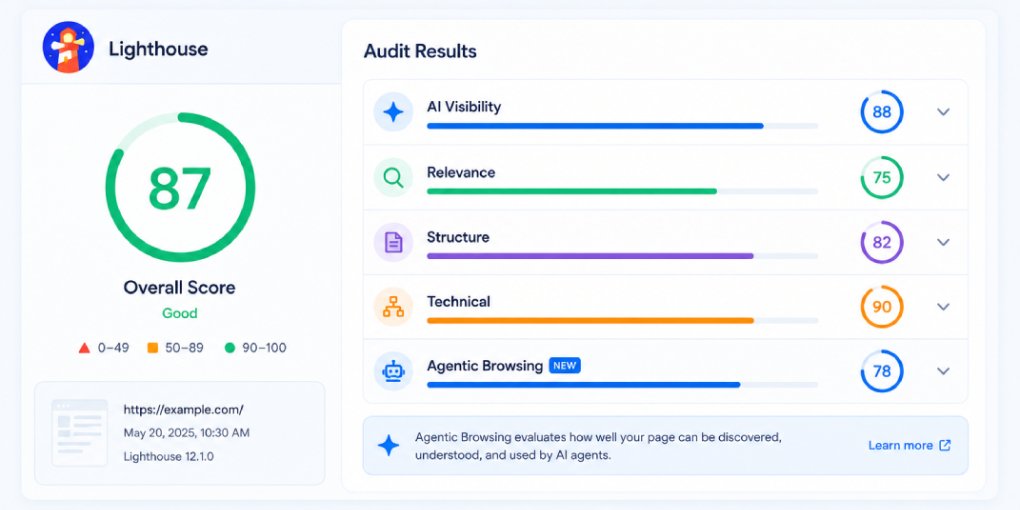
Google didn’t just acknowledge llms.txt. They built an automated audit for it. The llms.txt check is now part of Lighthouse, the same tool developers use to measure performance, accessibility, and SEO. That puts AI agent readiness alongside the metrics that every development team already monitors.
Here’s what the audit actually does, what it looks for, and what happens when you fail it.
Where the check lives
The llms.txt audit sits inside a new Lighthouse category called Agentic browsing. This category is separate from the existing Performance, Accessibility, Best Practices, and SEO categories. Google created an entirely new section for AI agent compatibility, which signals how important they consider this area.
The agentic browsing category includes multiple audits beyond llms.txt: checks for WebMCP integration, agent-accessible navigation, layout stability for automated browsing, and other signals that determine whether AI agents can effectively interact with your site.
But llms.txt is the discoverability foundation. Without it, agents have to figure out what your site does by crawling. With it, they know immediately.
What the audit checks
The Lighthouse llms.txt audit is straightforward. It sends a request to yoursite.com/llms.txt and evaluates the response:
Does the file exist? The audit checks whether a request to /llms.txt returns a 200 status code. A 404 means the file doesn’t exist and the audit fails immediately.
Is the response valid? The file needs to be a text file with readable content. An empty file or a file that returns HTML instead of plain text will fail.
Does it follow the expected format? The llms.txt specification uses a simple markdown structure: a title line starting with #, a description, and optional sections with links to key pages. The audit checks for basic structural compliance.
The audit doesn’t deeply validate every field or check whether your listed URLs are accurate. It’s a presence and format check, not a content quality assessment. But presence alone is enough to pass and enough to signal AI readiness.
Pass vs fail
The audit result is binary: pass or fail. There’s no partial credit. Either you have a valid llms.txt at your domain root or you don’t.
A pass means Lighthouse confirms your site has declared itself to AI systems. This contributes positively to your overall agentic browsing score.
A fail means your site has no machine-readable manifest for AI discovery. Every AI agent that visits your site has to crawl and interpret your structure on its own, which is slower, less reliable, and more likely to result in the agent moving to a competitor.
What developers will see
When a developer runs a Lighthouse audit (through Chrome DevTools, PageSpeed Insights, or CI/CD pipelines), they’ll see the agentic browsing category alongside the familiar Performance and SEO scores. If llms.txt is missing, it shows as a failed audit with a recommendation to create the file.
This is significant because Lighthouse audits are embedded in development workflows at every level. They run in CI/CD pipelines, they appear in pull request checks, and they show up in Chrome DevTools every time a developer opens their site. A failing llms.txt audit will be visible and persistent until addressed.
For teams that track Lighthouse scores as KPIs, a failing agentic browsing audit will create internal pressure to fix it, similar to how failing accessibility audits drove widespread adoption of alt text and ARIA labels.
The adoption curve this creates
Every Lighthouse audit follows the same pattern. When Google adds a check, awareness spikes, tooling catches up, and adoption accelerates. We saw this with HTTPS, with Core Web Vitals, with accessibility requirements.
The llms.txt audit is at the very beginning of this curve. Most sites don’t have the file yet. Most developers haven’t seen the audit yet. But as Lighthouse rolls this into stable releases and PageSpeed Insights starts surfacing it, the pressure to comply will build rapidly.
Early adopters get two advantages: they pass the audit before competitors do, and they start building AI agent trust while the standard is still new.
How to pass the audit
Create an llms.txt file and deploy it to your domain root. The file should include:
A title line with your site name. A brief description of what your site does. A curated list of your most important pages with URLs and short descriptions.
You can write it manually or use the hey-eye llms.txt generator to create a properly formatted file based on your site’s actual structure. Upload the file to your root directory, verify it’s accessible at yoursite.com/llms.txt, and run Lighthouse again. The audit should pass immediately.
Beyond passing the audit
Passing the Lighthouse check is the minimum. A well-crafted llms.txt file does more than satisfy an audit. It guides AI agents to your most important content, explains your site’s purpose in machine-readable format, and reduces the friction between an agent’s first visit and a successful interaction.
Run your site through hey-eye to check not just your llms.txt status but your complete AI visibility profile. The Authority & Trust pillar checks for llms.txt alongside robots.txt configuration, AI crawler access, and other trust signals that together determine how AI systems perceive your site.
The audit exists. The check is live. The only question is whether your site passes it today or waits until your competitors pass it first.