Both files live at the root of your domain. Both are plain text. Both tell AI systems something about your site. But that’s where the similarity ends. robots.txt and llms.txt serve fundamentally different purposes, and confusing them leads to gaps in your AI visibility strategy.
What robots.txt does
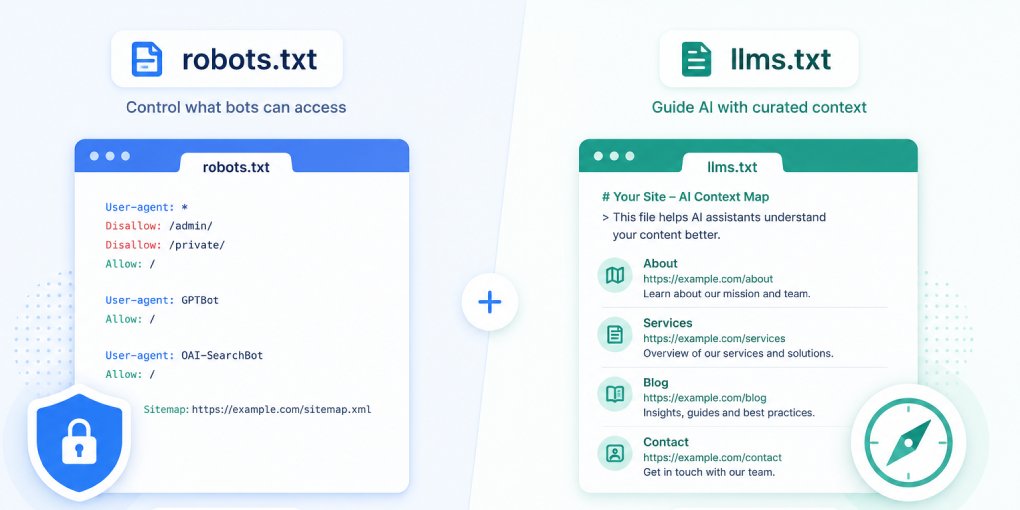
robots.txt is an access control file. It tells crawlers what they’re allowed to visit and what’s off limits. It’s been a web standard since 1994 and every major crawler respects it.
The language is simple: allow or disallow, per user-agent, per path. A robots.txt file doesn’t explain anything about your site. It doesn’t describe your content. It doesn’t tell a crawler which pages are most important. It just says “you can go here” or “you can’t go there.”
For AI visibility, robots.txt is the gatekeeper. If you block OAI-SearchBot, your content won’t appear in ChatGPT Search. If you block ClaudeBot, Claude can’t access your pages. If you block Google-Extended, your content won’t feed into Gemini or AI Overviews. The decision is binary: access granted or access denied.
What llms.txt does
llms.txt is a discovery and context file. It tells AI systems what your site is about, what content exists, and which pages matter most. It doesn’t control access. It provides understanding.
Where robots.txt answers “can I crawl this?”, llms.txt answers “what should I know about this site?” It’s the difference between a security guard checking IDs at the door and a concierge explaining what’s inside.
An llms.txt file typically includes your site name, a description of what you do, and a curated list of key pages with brief explanations. It gives AI systems a structured overview they can process in a single request, instead of crawling dozens of pages to piece together the same understanding.
Where they overlap
Both files affect AI crawler behavior, but at different stages:
robots.txt acts first. Before a crawler reads any content, it checks robots.txt. If access is denied, the interaction ends. The crawler never sees your llms.txt, your content, or your schema.
llms.txt acts second. After a crawler has permission to access your site, llms.txt helps it understand what it’s looking at. It provides the map that makes crawling efficient and targeted.
This means robots.txt is a prerequisite for llms.txt. There’s no point having a perfect llms.txt if your robots.txt blocks the crawlers you want to reach. But having a permissive robots.txt without an llms.txt means crawlers can access everything but have no guidance about what matters.
The practical differences
| robots.txt | llms.txt | |
|---|---|---|
| Purpose | Access control | Content discovery |
| Language | Allow/Disallow directives | Markdown with descriptions |
| Audience | All crawlers (search + AI) | AI systems specifically |
| Been around since | 1994 | 2024 |
| Google Lighthouse check | No dedicated audit | Yes, agentic browsing audit |
| Effect of missing it | Crawlers use default access | Crawlers figure things out slowly |
| Effect of misconfiguring | Blocks legitimate crawlers | Misleads AI about site purpose |
Do you need both?
Yes. They’re complementary, not interchangeable.
Without robots.txt, you have no control over which AI crawlers access your content. Every bot, including ones you might not want, can crawl everything. Even if your goal is maximum visibility, you still want a robots.txt that explicitly allows AI crawlers. Explicit permission is clearer than no file at all, and it lets you selectively block specific bots if your policy changes.
Without llms.txt, crawlers can still access your content but they have to discover and interpret your site structure on their own. For a simple 10-page site, that’s manageable. For a site with hundreds of pages across multiple sections, the crawler has to make decisions about what’s important without guidance. An llms.txt file eliminates that guesswork.
A common misconfiguration
Some site owners add AI-friendly directives to their robots.txt and assume they’re done. They allow GPTBot, ClaudeBot, and OAI-SearchBot, add their sitemap reference, and move on. This is a good start, but it’s only half the picture.
The crawlers now have access, but they have no context. They’ll crawl your homepage, follow links, and eventually build some understanding of your site. But they’ll treat your privacy policy with the same priority as your flagship product page, because nothing tells them otherwise.
An llms.txt file fixes this by explicitly saying: “Here’s what matters. Here’s what this site does. Here are the pages worth focusing on.” It turns undirected crawling into guided discovery.
How to implement both
robots.txt should explicitly allow the AI crawlers you want. Use the hey-eye robots.txt generator to create a properly configured file that lists each AI crawler individually with clear Allow directives.
llms.txt should describe your site and highlight your most important content. Use the hey-eye llms.txt generator to create a structured file based on your site’s actual pages.
Deploy both to your domain root. Verify they’re accessible at yoursite.com/robots.txt and yoursite.com/llms.txt. Then run your site through hey-eye to confirm both are detected correctly in the Authority & Trust pillar.
The bottom line
robots.txt is the lock on your door. llms.txt is the welcome sign inside. You need the lock configured correctly so the right visitors can enter. And you need the welcome sign so they know where to go once they’re in.
Neither file replaces the other. Together, they form the first two layers of AI visibility: access and discovery. Everything else, schema, structure, content quality, builds on top.