When an LLM lands on your page, it has a choice: parse your entire HTML and figure out what the page is about, or read a structured data block that tells it immediately. JSON-LD schema is that structured data block. It’s a machine-readable summary that sits in your page’s head and gives AI systems a shortcut to understanding your content.
Pages with proper schema consistently score higher on AI extractability. Not because the content is better, but because the packaging is better.
What JSON-LD actually does
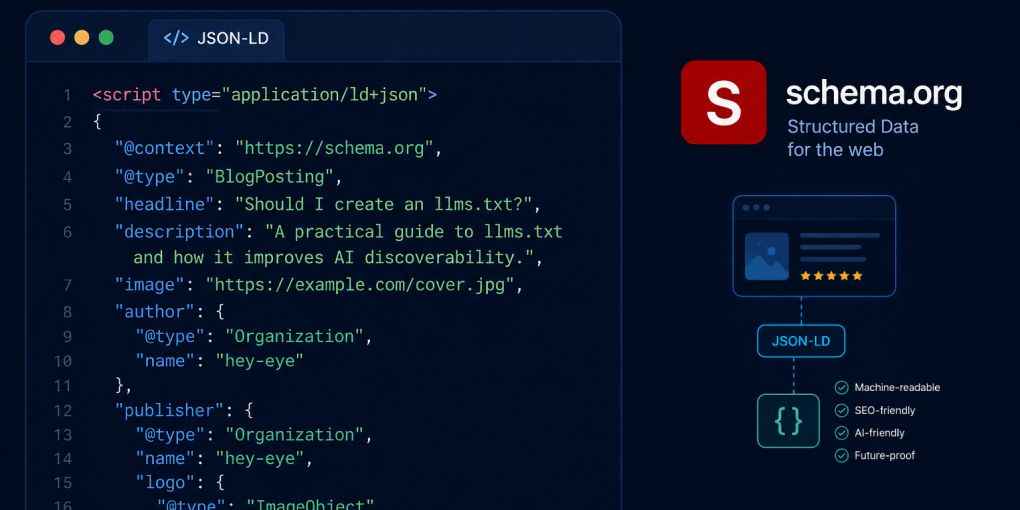
JSON-LD (JavaScript Object Notation for Linked Data) is a script block you add to your page’s HTML. It describes your content using a standardized vocabulary from Schema.org. When a search engine or LLM encounters it, they get structured metadata without parsing your visual layout.
A blog post’s JSON-LD might declare: this is an Article, the headline is X, the author is Y, it was published on this date, and this is the featured image. An LLM reading that block immediately knows what it’s dealing with before processing a single paragraph of body text.
This matters because LLMs make triage decisions. When a model has dozens of potential sources to extract from, pages that self-describe through schema get processed first. They’re easier to parse, easier to attribute, and easier to cite.
Which schema type to use
The schema type depends on your content. Using the wrong type is almost as bad as using none at all, because it gives models incorrect signals about what they’re reading.
Article. For blog posts, news articles, opinion pieces, and any long-form written content. Include headline, author, datePublished, dateModified, image, and description.
FAQPage. For pages that answer multiple questions. Each question-answer pair gets its own structured entry. This is one of the most powerful schemas for LLM visibility because models can extract individual Q&A pairs directly.
HowTo. For step-by-step guides, tutorials, and instructional content. Each step gets a name and description. Models love this format because it maps directly to how users ask “how do I…” questions.
Product. For product pages. Include name, description, price, availability, and review data. Shopping agents rely heavily on Product schema to compare items across sites without scraping visual layouts.
LocalBusiness. For businesses with a physical location. Include address, phone, hours, and service area. Local AI queries increasingly pull from this schema.
Organization. For your About page or homepage. Include name, logo, social profiles, and contact information. This feeds the authority signals that models use to evaluate source credibility.
BreadcrumbList. For any page with navigation breadcrumbs. This tells models where the page sits in your site hierarchy, which helps them understand context and topical relationships.
The anatomy of good Article schema
Since most blog owners start with Article schema, here’s what a complete implementation looks like:
{
  "@context": "https://schema.org",
  "@type": "Article",
  "headline": "Your Article Title",
  "description": "A concise summary of what the article covers.",
  "image": "https://yoursite.com/images/article-hero.jpg",
  "datePublished": "2026-06-19T00:00:00Z",
  "dateModified": "2026-06-19T00:00:00Z",
  "author": {
    "@type": "Person",
    "name": "Your Name",
    "url": "https://linkedin.com/in/yourprofile"
  },
  "publisher": {
    "@type": "Organization",
    "name": "Your Site Name",
    "logo": {
      "@type": "ImageObject",
      "url": "https://yoursite.com/logo.png"
    }
  },
  "mainEntityOfPage": {
    "@type": "WebPage",
    "@id": "https://yoursite.com/your-article/"
  }
}
This block goes inside a <script type="application/ld+json"> tag in your page’s head section. It’s invisible to human visitors but immediately readable by every LLM and search engine that visits your page.
Common mistakes to avoid
Using the wrong type. A product page with Article schema confuses models about what they’re reading. Match the schema to the actual content type.
Missing required fields. An Article without datePublished or an author field is incomplete. Models may still read it, but incomplete schema reduces confidence in the data, which reduces citation likelihood.
Duplicate schema blocks. Some CMS plugins generate schema automatically, and site owners add manual schema on top. Two conflicting Article blocks on the same page create ambiguity. Check for duplicates before adding your own.
Outdated dates. A dateModified that never gets updated tells models the content might be stale. If you update an article, update the dateModified field too.
Placeholder data. Schema with “Author Name” or “example.com” as values is worse than no schema at all. It signals a template that was never properly configured.
Generate schema automatically
Writing JSON-LD by hand works for a few pages but doesn’t scale. The hey-eye JSON-LD Schema Generator creates properly formatted schema for any content type. Enter your page details, select the schema type, and get a ready-to-paste script block.
After adding schema to your page, run it through hey-eye to verify it’s detected correctly. The AI Extractability pillar specifically checks for JSON-LD presence and completeness. You can also validate the markup with Google’s Rich Results Test to confirm it meets their requirements.
The effort-to-impact ratio
JSON-LD schema is one of the highest-leverage optimizations in AI visibility. Adding a single script block to your page’s head takes five minutes and immediately gives every LLM a structured summary of your content. No other optimization delivers this much machine-readability for this little effort.
If your pages don’t have schema yet, that’s the first thing to fix. Not tomorrow. Today.