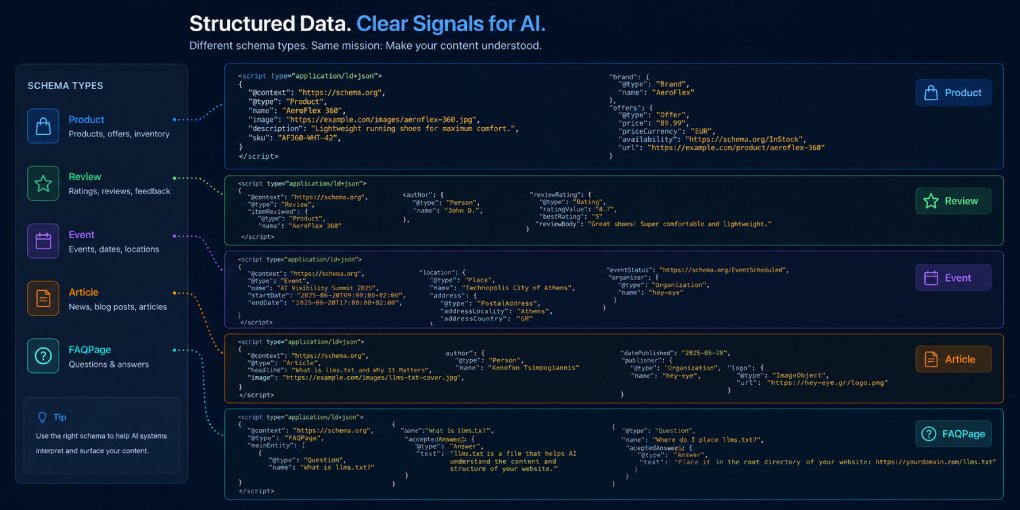
Every page on your site should have JSON-LD schema. But knowing that and knowing which schema to use for which page are different things. Here are ready-to-use examples for the most common content types, with explanations of what each field does and why it matters for AI visibility.
Copy any example, replace the placeholder values with your actual data, and paste it inside a <script type="application/ld+json"> tag in your page’s head section.
Article (blog posts, news, opinion pieces)
Use this for any long-form written content.
{
  "@context": "https://schema.org",
  "@type": "Article",
  "headline": "Your Article Title Here",
  "description": "A one or two sentence summary of the article.",
  "image": "https://yoursite.com/images/article-hero.jpg",
  "datePublished": "2026-07-08T00:00:00Z",
  "dateModified": "2026-07-08T00:00:00Z",
  "author": {
    "@type": "Person",
    "name": "Author Name",
    "url": "https://linkedin.com/in/authorprofile"
  },
  "publisher": {
    "@type": "Organization",
    "name": "Your Site Name",
    "logo": {
      "@type": "ImageObject",
      "url": "https://yoursite.com/logo.png"
    }
  },
  "mainEntityOfPage": {
    "@type": "WebPage",
    "@id": "https://yoursite.com/your-article/"
  }
}
Key fields: headline and description are what LLMs read first. dateModified signals freshness. The author block helps AI systems evaluate expertise.
FAQPage (Q&A content)
Use this when your page answers multiple distinct questions. This is one of the highest-impact schemas for AI visibility because LLMs can extract individual Q&A pairs directly.
{
  "@context": "https://schema.org",
  "@type": "FAQPage",
  "mainEntity": [
    {
      "@type": "Question",
      "name": "What is AI extractability?",
      "acceptedAnswer": {
        "@type": "Answer",
        "text": "AI extractability measures how easily a language model can find, isolate, and cite specific pieces of content from your page."
      }
    },
    {
      "@type": "Question",
      "name": "How do I improve my extractability score?",
      "acceptedAnswer": {
        "@type": "Answer",
        "text": "Add JSON-LD schema, use clear heading hierarchy, keep paragraphs short, and include definitional statements that models can quote directly."
      }
    }
  ]
}
Key fields: Each Question must have a name (the question text) and an acceptedAnswer with text (the answer). Keep answers concise. LLMs extract them verbatim.
HowTo (step-by-step guides, tutorials)
Use this for instructional content. AI assistants frequently pull HowTo schema when users ask “how do I…” questions.
{
  "@context": "https://schema.org",
  "@type": "HowTo",
  "name": "How to Add JSON-LD Schema to Your Website",
  "description": "A step-by-step guide to implementing structured data on any page.",
  "step": [
    {
      "@type": "HowToStep",
      "name": "Choose the right schema type",
      "text": "Identify your content type (article, product, FAQ) and select the matching Schema.org type."
    },
    {
      "@type": "HowToStep",
      "name": "Create the JSON-LD block",
      "text": "Write or generate the JSON-LD code with all required fields for your chosen schema type."
    },
    {
      "@type": "HowToStep",
      "name": "Add to your page",
      "text": "Paste the JSON-LD inside a script tag with type application/ld+json in your page's head section."
    },
    {
      "@type": "HowToStep",
      "name": "Validate",
      "text": "Use Google's Rich Results Test to check for errors, then run the page through hey-eye to verify AI extractability."
    }
  ]
}
Key fields: Each step needs a name (short label) and text (full instruction). Keep steps atomic. One action per step.
Product (e-commerce pages)
Essential for any page that sells something. AI shopping agents rely heavily on Product schema for comparison and recommendation.
{
  "@context": "https://schema.org",
  "@type": "Product",
  "name": "Product Name",
  "description": "A clear description of what the product is and does.",
  "image": "https://yoursite.com/images/product.jpg",
  "brand": {
    "@type": "Brand",
    "name": "Brand Name"
  },
  "sku": "SKU-12345",
  "offers": {
    "@type": "Offer",
    "price": "49.99",
    "priceCurrency": "USD",
    "availability": "https://schema.org/InStock",
    "url": "https://yoursite.com/product/"
  },
  "aggregateRating": {
    "@type": "AggregateRating",
    "ratingValue": "4.5",
    "reviewCount": "127"
  }
}
Key fields: price must be a plain number string, not formatted (“49.99” not “$49.99”). availability uses Schema.org URL values. aggregateRating helps agents rank options.
LocalBusiness (physical locations)
Use this on your homepage or location pages if you have a physical business address.
{
  "@context": "https://schema.org",
  "@type": "LocalBusiness",
  "name": "Your Business Name",
  "description": "What your business does.",
  "image": "https://yoursite.com/storefront.jpg",
  "address": {
    "@type": "PostalAddress",
    "streetAddress": "123 Main Street",
    "addressLocality": "City",
    "addressRegion": "State",
    "postalCode": "12345",
    "addressCountry": "US"
  },
  "telephone": "+1-555-123-4567",
  "url": "https://yoursite.com",
  "openingHoursSpecification": [
    {
      "@type": "OpeningHoursSpecification",
      "dayOfWeek": ["Monday", "Tuesday", "Wednesday", "Thursday", "Friday"],
      "opens": "09:00",
      "closes": "17:00"
    }
  ]
}
Key fields: address must be complete and accurate. telephone should include country code. openingHoursSpecification helps AI agents answer “is this place open now?” queries.
Organization (About page, homepage)
Use this to declare who you are as an entity. Helps AI systems build a knowledge graph entry for your brand.
{
  "@context": "https://schema.org",
  "@type": "Organization",
  "name": "Your Organization Name",
  "url": "https://yoursite.com",
  "logo": "https://yoursite.com/logo.png",
  "description": "What your organization does.",
  "sameAs": [
    "https://linkedin.com/company/yourcompany",
    "https://twitter.com/yourcompany",
    "https://facebook.com/yourcompany"
  ],
  "contactPoint": {
    "@type": "ContactPoint",
    "email": "contact@yoursite.com",
    "contactType": "customer service"
  }
}
Key fields: sameAs links your site to social profiles, helping models verify your entity exists across the web. This directly feeds authority signals.
BreadcrumbList (any page with navigation hierarchy)
Add this to every page that has breadcrumb navigation. It tells AI systems exactly where the page sits in your site structure.
{
  "@context": "https://schema.org",
  "@type": "BreadcrumbList",
  "itemListElement": [
    {
      "@type": "ListItem",
      "position": 1,
      "name": "Home",
      "item": "https://yoursite.com"
    },
    {
      "@type": "ListItem",
      "position": 2,
      "name": "Blog",
      "item": "https://yoursite.com/blog/"
    },
    {
      "@type": "ListItem",
      "position": 3,
      "name": "Article Title"
    }
  ]
}
Key fields: The last item (current page) should omit the item URL. position must be sequential starting from 1.
Generate schema automatically
Writing JSON-LD by hand works but doesn’t scale. The hey-eye JSON-LD Schema Generator creates properly formatted schema for any content type. Enter your page details, choose the type, and get a ready-to-paste code block.
After adding schema, verify it with hey-eye. The AI Extractability pillar checks for JSON-LD presence and completeness, and tells you if anything is missing or malformed.