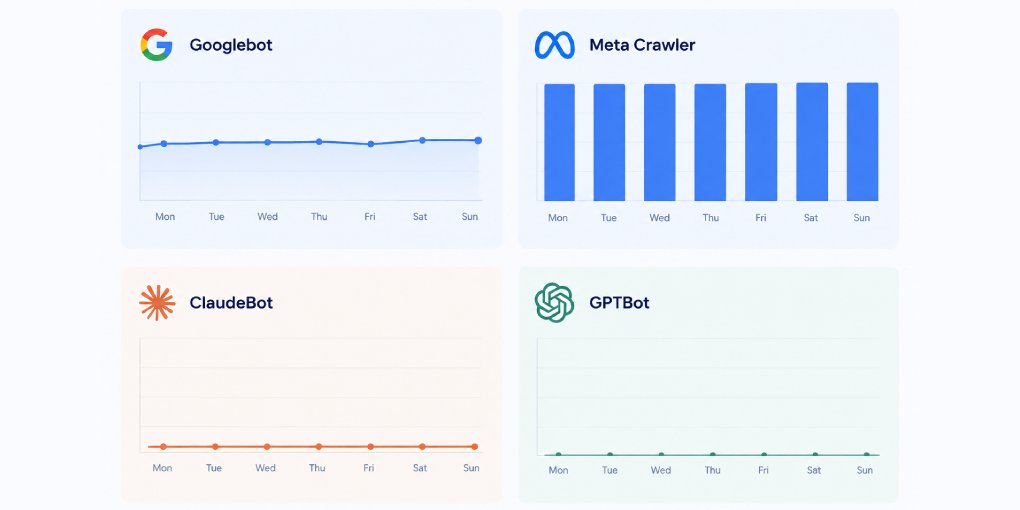
Google Analytics won’t show you AI crawler visits. Neither will most analytics platforms. They require JavaScript execution to register a pageview, and AI crawlers don’t run JavaScript. Your site could be getting hundreds of AI crawler visits daily, and your analytics dashboard would show zero.
The only reliable way to see this traffic is your server logs.
Finding AI crawlers in your logs
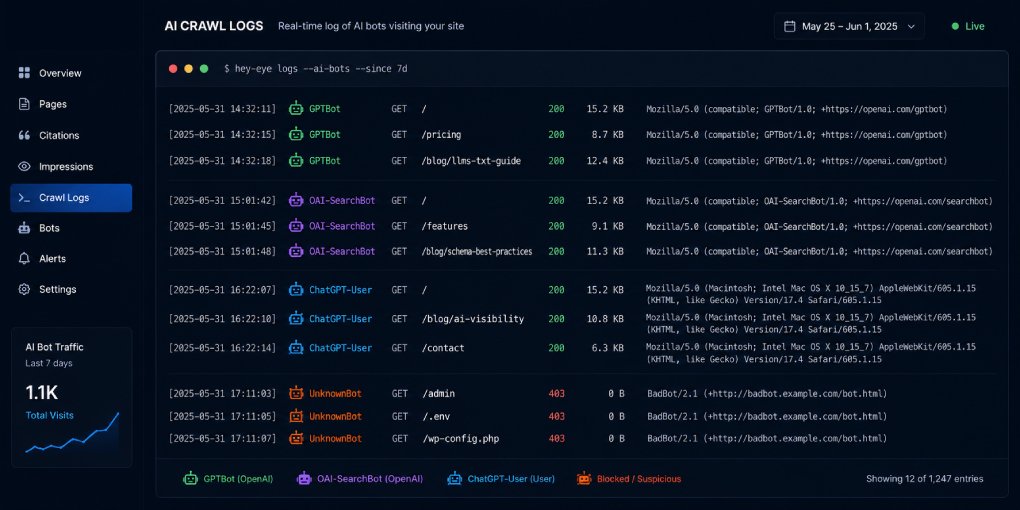
Every HTTP request to your server gets logged with a user-agent string that identifies who made the request. AI crawlers use specific, identifiable user-agent strings.
On Apache or Nginx, your access logs are typically at /var/log/apache2/access.log or /var/log/nginx/access.log. Search them with grep:
grep -iE "gptbot|oai-searchbot|chatgpt-user|claudebot|anthropic|perplexitybot|google-extended|bytespider|meta-externalagent|applebot-extended" access.logOn Cloudflare, check Workers analytics if you have a Worker, or Firewall Events in the Security section. You can create a firewall rule that matches AI bot user-agents set to “Log” (not block) to track visits without interfering.
On Vercel, Netlify, or similar platforms, check the function logs or edge logs. Some platforms expose server-side request logs through their dashboard.
What the log entries look like
A typical AI crawler log entry contains the same fields as any request:
104.18.32.47 - - [08/Jul/2026:14:23:01 +0000] "GET /blog/heading-structure/ HTTP/2.0" 200 12453 "-" "Mozilla/5.0 AppleWebKit/537.36 (compatible; GPTBot/1.0; +https://openai.com/gptbot)"The key parts: the IP address, the timestamp, the requested URL, the HTTP status code (200 means success, 404 means not found), and the user-agent string at the end that identifies the crawler.
Each AI company uses a distinct pattern:
| Crawler | User-agent contains | Operator |
|---|---|---|
| GPTBot | GPTBot/1.0 | OpenAI (training) |
| OAI-SearchBot | OAI-SearchBot | OpenAI (search) |
| ChatGPT-User | ChatGPT-User | OpenAI (user-initiated) |
| ClaudeBot | ClaudeBot/1.0 | Anthropic |
| PerplexityBot | PerplexityBot/1.0 | Perplexity |
| Google-Extended | Google-Extended | Google (AI features) |
| Bytespider | Bytespider | ByteDance |
| Meta-ExternalAgent | Meta-ExternalAgent | Meta |
| Applebot-Extended | Applebot-Extended | Apple |
What patterns to watch for
Once you can see AI crawler traffic, look for these patterns:
Which pages get crawled most. If GPTBot consistently visits your pricing page but never your blog, that tells you what AI users are asking about your business. If PerplexityBot hits your documentation heavily, your docs are being cited in Perplexity answers.
Crawl frequency. Are visits increasing or decreasing over time? Increasing AI crawler visits means your content is becoming more relevant to AI-powered queries. A sudden drop might mean your robots.txt changed or a structural issue appeared.
404 responses to crawlers. If AI crawlers are requesting URLs that return 404, they’re following stale links or outdated references. These are pages that AI systems think should exist but don’t. Consider creating them or setting up redirects.
Response times. If your server responds slowly to AI crawlers, they may time out and skip your content. Check whether AI crawler requests are taking significantly longer than normal user requests.
Which crawlers are absent. If you see GPTBot but never ClaudeBot, check your robots.txt. You might be accidentally blocking Claude. If you see no AI crawlers at all, your robots.txt might have a blanket Disallow.
Setting up automated monitoring
Checking logs manually doesn’t scale. Set up a simple script that runs daily and summarizes AI crawler activity:
#!/bin/bash
# Daily AI crawler report
LOG="/var/log/nginx/access.log"
DATE=$(date -d "yesterday" +%d/%b/%Y)

echo "=== AI Crawler Report for $DATE ==="
echo ""
echo "--- Visits by crawler ---"
grep "$DATE" $LOG | grep -ioE "gptbot|oai-searchbot|chatgpt-user|claudebot|perplexitybot|google-extended|bytespider|meta-externalagent" | sort | uniq -c | sort -rn
echo ""
echo "--- Top crawled pages ---"
grep "$DATE" $LOG | grep -iE "gptbot|claudebot|perplexitybot|oai-searchbot" | awk '{print $7}' | sort | uniq -c | sort -rn | head -10
echo ""
echo "--- Errors served to crawlers ---"
grep "$DATE" $LOG | grep -iE "gptbot|claudebot|perplexitybot|oai-searchbot" | awk '$9 >= 400 {print $9, $7}' | sort | uniq -c | sort -rn
Run this via cron daily and pipe the output to email or a log file. It takes five minutes to set up and gives you ongoing visibility into a channel most site owners are completely blind to.
On Cloudflare Workers, you can log AI bot visits to KV storage and build a simple dashboard to track them over time without needing server access.
Connecting the data to your visibility strategy
AI crawler logs become truly valuable when you cross-reference them with your visibility scores.
Run your most-crawled pages through hey-eye. Are they your highest-scoring pages? If a page gets heavy crawler traffic but scores low on AI Extractability, the crawlers are visiting but probably not citing it effectively. Fix the structural issues and the citations should follow.
Conversely, if your highest-scoring pages rarely get crawled, there might be a discovery problem. Check your internal linking, your sitemap, and your llms.txt to make sure crawlers can find those pages.
Check your robots.txt configuration with the hey-eye robots.txt generator to ensure you’re not accidentally blocking crawlers you want to track.
The visibility gap you didn’t know you had
Most website owners optimize for a channel they can see (Google Search) while ignoring a channel they can’t (AI crawlers). Server log analysis bridges that gap. It takes an hour to set up, costs nothing, and reveals traffic patterns that no analytics tool currently shows.
The crawlers are already visiting. The question is whether you know about it.