You’ve optimized individual pages. You’ve added schema, fixed headings, and improved your meta descriptions. But do you know how your entire site performs as a whole? A website visibility audit answers that question by crawling every page and scoring them against the signals that search engines and AI systems actually use.
What a visibility audit checks
A visibility audit goes beyond traditional SEO crawls. It evaluates every indexable page on your site across multiple dimensions simultaneously. The easiest way to audit your website is through hey-eye Website Audit.
Technical health. Can crawlers access your pages? Are there broken links, redirect chains, or orphan pages that nothing links to? Does your robots.txt block anything it shouldn’t? These are the basics, but they’re also the most common reasons sites underperform.
Structural signals. Does every page have a unique title tag? Is the heading hierarchy clean (H1 > H2 > H3) across all pages? Are canonical URLs properly declared? Do pages have complete Open Graph metadata? Structural issues that seem minor on one page become patterns that hurt your entire domain when they appear across dozens of pages.
AI readiness. This is where a visibility audit differs from a traditional SEO audit. It checks whether your content is structured for AI extraction: JSON-LD schema presence and correctness, paragraph length distribution, list usage, internal linking density, breadcrumb markup, and whether AI crawlers are allowed in your robots.txt.
Content quality signals. Readability scores, sentence length averages, heading density, and whether content follows patterns that AI models can efficiently parse and cite.
Trust indicators. Author attribution, About and Contact page links, social profile references, HTTPS status, and the presence of AI discovery files like llms.txt.
Why page-level analysis isn’t enough
Analyzing a single page tells you how that page performs. It doesn’t tell you whether the rest of your site is helping or hurting it.
Search engines and AI systems evaluate sites holistically. A domain where 80% of pages have poor structure creates a reputation that affects every page, including the well-optimized ones. One excellent page surrounded by fifty mediocre pages doesn’t perform as well as it would on a consistently strong domain.
A visibility audit reveals these patterns. You might discover that all your blog posts score well but your product pages are structurally broken. Or that pages created before 2024 lack schema markup while newer pages have it. Or that your landing pages, the ones driving the most traffic, have the worst AI extractability scores.
These patterns are invisible at the page level. They only emerge when you look at the full picture.
What to look for in the results
After running an audit, focus on three things:
Consistency gaps. If your scores range from 20 to 90 across different pages, you have a consistency problem. Identify what the high-scoring pages have in common and apply those patterns to the low-scoring pages.
Systematic failures. If 90% of your pages are missing JSON-LD schema, that’s not a page-level fix. It’s a template-level fix. One change to your CMS template fixes every page at once.
Your weakest pillar. If your site consistently scores low on one specific dimension (extractability, structure, clarity, or trust), that’s your priority. Fixing the weakest pillar across the site moves the needle more than perfecting individual pages.
Running your first audit
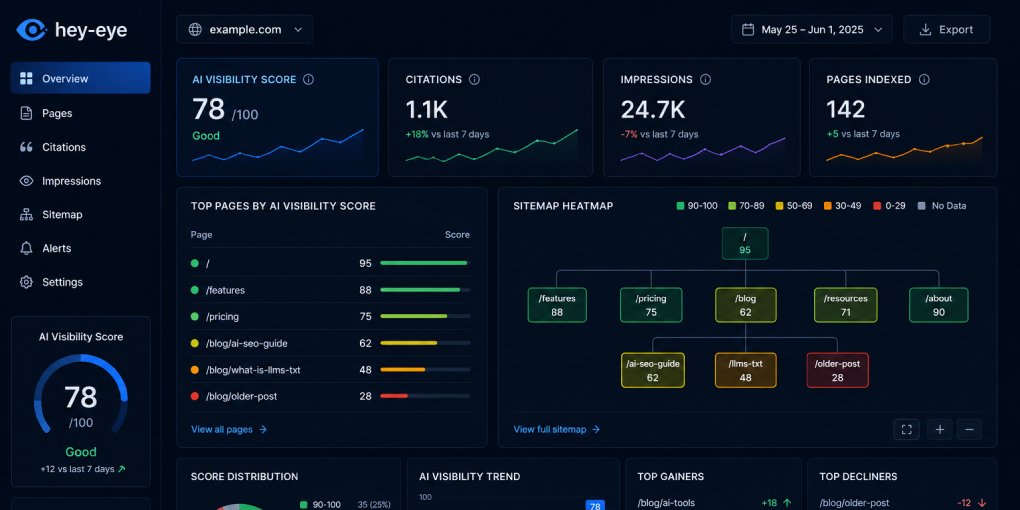
The hey-eye Website Audit crawls your sitemap automatically. Enter your domain, and it discovers every indexable page, analyzes each one across all four visibility pillars, and returns a sortable scorecard.
You can sort by overall score to find your weakest pages, or sort by a specific pillar to find targeted opportunities. Each page includes a detailed breakdown of which checks pass and which fail, so you know exactly what to fix.
For ongoing tracking, each audit gets stored in your Scan History. Run audits monthly to track whether your improvements are holding and to catch regressions early.
When to run one
Before a content push. Understand your baseline before investing in new content. You might find that fixing existing pages delivers more visibility than publishing new ones.
After template changes. CMS updates, theme changes, and redesigns often introduce structural regressions. A post-change audit catches problems before they compound.
When traffic plateaus. If your growth has stalled, an audit usually reveals why. The answer is almost always a systematic structural issue, not a content quality problem.
Quarterly. Standards evolve. New AI discovery files become expected. Schema requirements expand. A regular audit keeps you current.
Start with the worst pages
You don’t need to fix everything at once. Sort by lowest score, fix the bottom five, re-audit, and move to the next five. Incremental improvement at the site level compounds faster than perfecting individual pages.
Run your first audit at hey-eye.gr/website-audit and see where your site stands across every dimension that matters for visibility.