Until now, using hey-eye meant opening the website, entering a URL, and reading the results on screen. That workflow is fine for one-off checks, but it breaks down when you’re deep in a conversation with an AI assistant, discussing your content strategy, and you want instant visibility data without switching tabs.
That changes today. hey-eye now supports MCP, the Model Context Protocol, which lets you connect your favorite LLM directly to our analysis engine.
What is MCP?
The Model Context Protocol is an open standard that allows AI assistants to interact with external tools and services. Instead of the assistant only having access to its training data and web search, MCP lets it call real APIs, retrieve real data, and take real actions on your behalf.
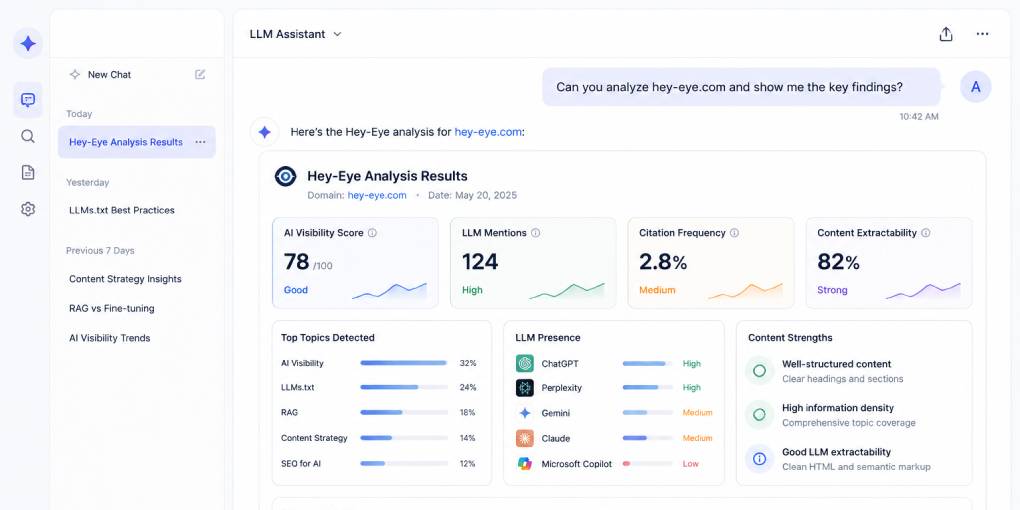
Think of it as giving your AI assistant hands. Without MCP, it can only talk about AI visibility. With the hey-eye MCP connector, it can actually analyze a page and show you the results inside the conversation.
What you can do with it
Once connected, you can ask your AI assistant to run hey-eye analyses naturally, as part of your conversation:
“Analyze hey-eye.gr and show me the score breakdown.”
“Compare my homepage with my main competitor’s landing page.”
“Check if my blog post has proper JSON-LD schema.”
“What’s my AI extractability score and how can I improve it?”
The assistant calls hey-eye’s API through MCP, retrieves the full analysis results, and presents them in context. You get the same four-pillar breakdown (Structural Integrity, AI Extractability, Content Clarity, Authority & Trust) plus the Agent Readiness checks, all without leaving your chat window.
This is especially powerful for iterative workflows. You can discuss your content strategy, analyze a page, get specific recommendations, make changes, and re-analyze, all in one continuous conversation.
How to connect
The hey-eye MCP endpoint is available at:
https://hey-eye.gr/mcpIn Claude: Go to Settings, find the MCP connectors section, and add hey-eye from the available connectors. Once connected, Claude can run analyses directly.
In other MCP-compatible clients: Add the endpoint URL to your MCP server configuration. Any client that supports the Model Context Protocol can connect.
In Claude Code or custom agents: Add the MCP server to your configuration file and the analysis tools become available programmatically.
No API key is required for basic analyses. The same rate limits that apply to the hey-eye website apply to MCP requests.
Why this matters
MCP bridges the gap between AI conversation and AI action. Without it, your assistant can give you general advice about AI visibility based on its training data. That advice might be outdated, generic, or wrong for your specific situation.
With the hey-eye MCP connector, the assistant works with real data from your actual pages. It doesn’t guess what your schema looks like. It checks. It doesn’t assume your heading structure is correct. It analyzes it. The recommendations become specific, accurate, and immediately actionable.
This is the difference between an assistant that talks about optimization and one that does optimization with you.
Built for the agentic web
The MCP connector is part of hey-eye’s broader commitment to the agentic web. We don’t just analyze whether other sites are agent-ready. We practice what we preach.
The hey-eye website includes an MCP Server Card, an Agent Skills Index, and the discovery files that AI agents look for. The MCP connector is the natural extension of that: making our analysis tools natively accessible to AI systems, not just humans with browsers.
Get started
If you’re already using an MCP-compatible assistant, connecting takes seconds. Add the hey-eye connector, ask it to analyze any URL, and see your AI visibility data appear directly in your conversation.
The web is moving toward a model where AI assistants don’t just advise. They act. The hey-eye MCP connector puts AI visibility analysis directly in that workflow.
Connect at hey-eye.gr/mcp and start analyzing from your next conversation.