Every public website gets probed. Constantly.
Not by people. By scripts that request thousands of paths that might exist on some site somewhere: a forgotten .env file, a WordPress plugin with a known hole, a backdoor someone else left behind.
I wanted to know exactly what they were looking for on my own site. So I took 30 days of Cloudflare data for hey-eye, pulled every request for a file that doesn’t exist, and sorted them by what the attacker was after.
One of those categories found something. I’ll get to that.
How I measured
- Source: Cloudflare HTTP analytics for hey-eye.gr, September 25 to October 24, 2026.
- External requests only. Internal Worker subrequests were removed, because they repeat the original request and double-count it.
- Unverified traffic only. Real search engines and AI crawlers that Cloudflare verifies were excluded. Why verification matters.
- Probe = a request for a path that is not part of the site. Every path was matched against the site’s real pages and assets, and the rest were classified by pattern.
Cloudflare samples high-volume analytics, so the counts below are estimates rounded to the nearest ten. The proportions are reliable. The exact totals are approximate.
The headline numbers
- About 69,800 probe requests in 30 days.
- 72% of all unverified traffic to the site was probing for something that doesn’t exist.
- At least 308 different IP addresses sent them.
My site runs on Cloudflare Workers. There is no PHP, no WordPress, no database admin panel. Most of what follows was aimed at technology I don’t have. That is the point: these scans don’t look at what you run. They try everything on everyone.
What they were looking for
| Category | Share of probes | Example paths | IPs |
|---|---|---|---|
| Webshells and backdoors | 29% | /w.php, /chosen.php, /this_is_a_new_hello_world.php | 92 |
.env and secret files | 22% | /.env, /.env.dev, /dashboard/.env, /.npmrc | 95 |
| Git and version control | 12% | /.git/config, /.git/HEAD, /.git/index | 71 |
| WordPress | 11% | /wp-admin/..., plugin file managers, xmlrpc.php | 109 |
| Config and backup files | 4% | /config.json, database.sql, *.bak | 53 |
| PHP info and debug pages | 3% | /phpinfo.php, /actuator/env, /server-status | 53 |
| Cloud credentials | 3% | /.aws/config, /gc-service.json, terraform.tfstate.backup | 45 |
| Dev-server exploits | 2% | /@fs/.env, /webpack-stats.json, Vite internals | 25 |
| Path traversal and system files | 2% | /@fs/proc/self/environ, ..%2f..%2f.env, Kubernetes tokens | 23 |
| APIs and GraphQL | 2% | /graphql, /playground, /api/fs/read | 38 |
| Admin panels and logins | 1% | /admin, cPanel, Magento admin | 35 |
| AI tool and LLM keys | 1% | /.env.anthropic, /.claude/settings.json, /.gemini/config.json | 14 |
| File managers and uploads | 1% | /userfiles, file manager scripts | 9 |
| SSH and private keys | 1% | /.ssh/authorized_keys, /id_dsa | 12 |
| Unclassified | 5% |
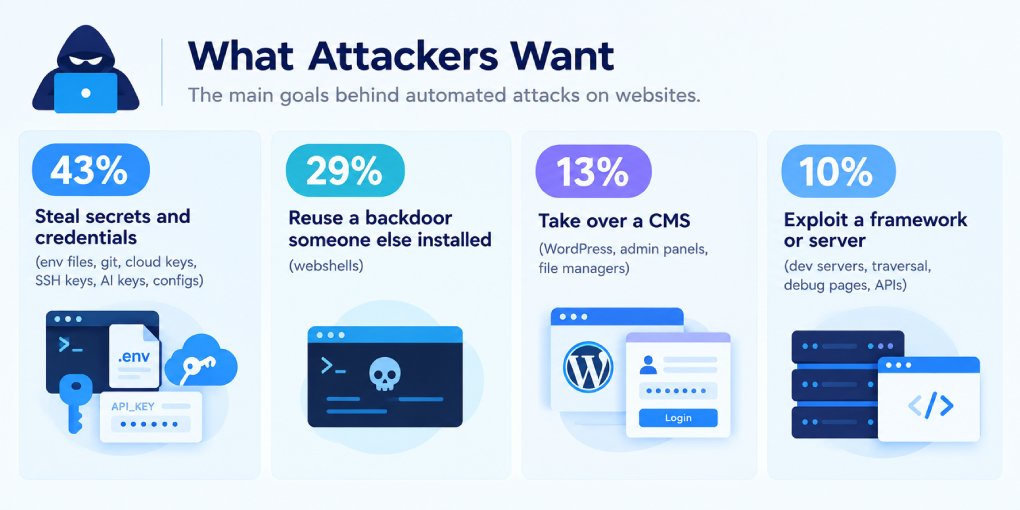
Grouped by what the attacker wants
| Goal | Share |
|---|---|
| Steal secrets and credentials (env files, git, cloud keys, SSH keys, AI keys, configs) | 43% |
| Reuse a backdoor someone else installed (webshells) | 29% |
| Take over a CMS (WordPress, admin panels, file managers) | 13% |
| Exploit a framework or server (dev servers, traversal, debug pages, APIs) | 10% |
The webshell category deserves a note. Names like w.php or chosen.php are not vulnerabilities. They are the filenames of backdoors that earlier attackers dropped on compromised sites. The scanner checks whether your site is already someone else’s.
How they disguise themselves
| What the request claimed to be | Share of probes |
|---|---|
| A normal browser | 39% |
| Nothing at all (empty user-agent) | 39% |
| A declared scanner or bot | 11% |
| An AI crawler | 6% |
| A script or library (Python, curl, Go) | 3% |
| Googlebot or Bingbot | 2% |
The interesting part is not the overall mix. It is how the disguise changes with the target.
- Webshell scans don’t hide at all. 96% had no user-agent. They are fast, cheap and aimed at everyone.
- WordPress scans, the same. 83% had no user-agent.
- Secret hunters look like browsers. 64% of
.envprobes and 82% of.gitprobes used a browser user-agent. - The most sensitive targets wear an AI costume. 72% of probes for SSH keys and 40% of path traversal attempts claimed to be an AI crawler.
That last one is not random. Many sites now allow AI crawlers through by name. Claiming to be ClaudeBot or GPTBot is a cheap way past a firewall rule that trusts the user-agent. The most impersonated names in these probes were ClaudeBot, Bytespider, CCBot, Applebot, OAI-SearchBot, Amazonbot and GPTBot.
Three patterns worth knowing
1. The loudest attacks come from very few machines. Ten IP addresses sent about 45% of all the webshell probes. Most belonged to large cloud providers, in data centers in India, Australia, South Korea and Hong Kong. The countries in your logs tell you where servers are rented, not where attackers are.
2. The trend is moving toward secrets. Comparing the first week of the period with the last:
| First week | Last week | Change | |
|---|---|---|---|
| Webshell probes | ~5,400 | ~1,800 | 3x down |
.env probes | ~1,800 | ~4,900 | 2.7x up |
Webshell scanning arrives in bursts from a handful of campaigns. Secret hunting kept growing steadily through the month.
3. Attackers now hunt for AI keys.
/.env.anthropic, /.claude/settings.json, /.gemini/config.json, /.cache/huggingface/token. A small category, but one that barely existed a year ago. An API key for a large language model is now worth stealing, and anyone who runs AI tooling inside a project folder is a potential target.
The one that found something: my own mistake
While checking response codes, one category stood out. Almost every probe got a 404. Requests to /.git/ got a 200.
My site’s .git folder was public.
Not all of it. The object files that hold the actual source code returned 404. But these did not:
| Path | What it exposes |
|---|---|
/.git/config | The repository’s remote URL, and any credentials embedded in it |
/.git/HEAD | The current branch |
/.git/logs/HEAD | Commit history, including author names and email addresses |
/.git/index | A list of every file in the project |
The scanners noticed. After reading the index, some went on to request specific object files by their hash. That is what an automated attempt to reconstruct a repository looks like.
How it happened. The site is deployed to Cloudflare Workers straight from GitHub. The Worker serves static files from a folder, and in my project that folder was the root of the repository. When Cloudflare builds from GitHub, it clones the repository, .git folder included, and uploads everything in the assets folder. So .git went live with the HTML.
What did not fix it. My first move was adding .git to .gitignore. That does nothing here. .gitignore tells Git which files to stop tracking. The deploy step never reads it.
What fixed it. A file called .assetsignore, a cache purge, and a firewall rule as a safety net.
What .assetsignore is
.assetsignore is a file you place in the root of your Cloudflare Workers static assets directory. It lists files and folders that must not be uploaded as public assets. It uses the same pattern syntax as .gitignore, but it is read by Cloudflare at deploy time, not by Git.
If your wrangler.jsonc points the assets directory at the project root, for example "directory": "./", then everything in your project is a candidate for publishing. .assetsignore is what keeps the wrong things out.
A typical .assetsignore
# Version control
.git
.gitignore
.gitattributes
.github
.gitlab-ci.yml

# Secrets and local config
.env
.env.*
.dev.vars
*.pem
*.key

# Project and tooling files
wrangler.jsonc
wrangler.toml
package.json
package-lock.json
node_modules
README.md

# Editor and OS files
.vscode
.idea
.DS_Store
Adjust it to your project. Do not add files that must stay public, such as robots.txt, llms.txt, sitemap.xml, ads.txt or an IndexNow key file.
The cleaner long-term fix is to keep the site’s files in a dedicated folder like public/ and point the assets directory there. Then nothing from the project root can be published by accident, whatever you forget to list.
What to check if you deploy from GitHub, or anywhere else
The risk is not specific to Cloudflare. It appears whenever the folder you publish is the same folder that holds your project.
- Know which folder your platform publishes. Cloudflare Workers uses
assets.directory. Cloudflare Pages, Netlify and Vercel use a build output or publish directory. If that setting is the repository root, assume every file in the repository will be public. - Git-connected builds include
.git. When a platform clones your repository to build it, the.gitfolder is in the working copy. Whether it gets published depends entirely on the publish folder and the ignore rules. - Deploying from your laptop is riskier. A local folder can also hold
.envfiles, editor settings, AI tool configs and anything else you never committed. .gitignoreprotects your repository, not your website. A.envthat is gitignored is safe from GitHub, but if it sits in the publish folder, it can still be deployed.- On a traditional server, block dotfiles at the web server level so that
/.git,/.envand similar paths are never served.
How to fix it if it happened to you
- Stop publishing it. Add an
.assetsignore(or move your site into a dedicated publish folder) and redeploy. - Purge the cache. Exposed files may keep being served from the CDN after the deploy. Purge them, or purge everything.
- Add a firewall rule as a safety net. On Cloudflare, a custom WAF rule with this expression and the action Block stops these requests before they reach anything:
starts_with(http.request.uri.path, "/.git") or starts_with(http.request.uri.path, "/.env") or starts_with(http.request.uri.path, "/.ssh") or starts_with(http.request.uri.path, "/.aws")- Read what was exposed. If the
urlline in.git/configcontains a token, revoke it immediately. Treat any credential that was reachable as leaked. - Verify. Open
https://yoursite.com/.git/configin a private window. You should get a 404 or 403, not a file.
What this means
Most of the attacks that hit a small site are blind. They don’t know or care what you run. They spray thousands of paths and wait for one to answer.
That cuts both ways. You can ignore the 98% aimed at technology you don’t use. But the 2% that matches a real mistake will be found, quickly and automatically, by someone who checks every site on the internet every day.
The probes on my site were not clever. They didn’t need to be. They only needed one folder I didn’t know was public.
If you want to see what crawlers can actually reach on your own site, the AI Crawler Tester checks robots.txt rules and live access for each bot. For the other side of the same logs, here is what verified AI crawlers did on my site over the same period.