A robots.txt file is a plain text file at your domain root that tells crawlers which parts of your site they may fetch. It has been a web standard since 1994 and the syntax has barely changed since.
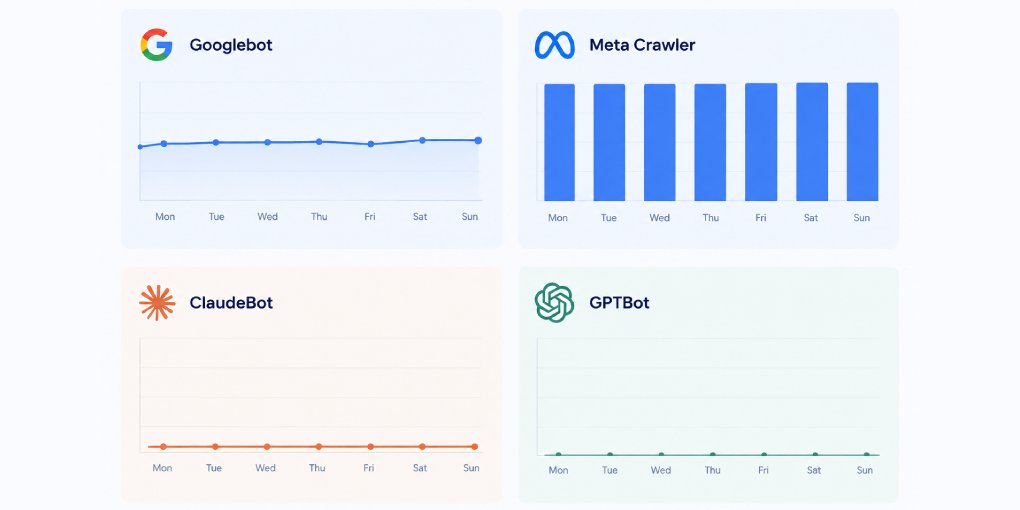
What has changed is who reads it. Alongside Googlebot and Bingbot, your file now gets parsed by GPTBot, ClaudeBot, PerplexityBot, OAI-SearchBot and a growing list of others. Most robots.txt guides were written before any of those existed.
This is how to build one from scratch, with the AI crawler section included rather than bolted on.
What it does and what it does not
robots.txt controls crawling. It does not control indexing, and it does not control access.
A disallowed URL can still appear in search results if other sites link to it, because the crawler knows the URL exists even though it never fetched the content. If you need a page kept out of results, use a noindex meta tag on the page itself and leave the crawler free to fetch it, since a blocked crawler can never see the noindex directive you added.
And robots.txt is a request, not a barrier. Well-behaved crawlers obey it. Anything else ignores it. If content genuinely must not be reached, it needs authentication, not a text file.
The syntax
Four directives cover almost everything.
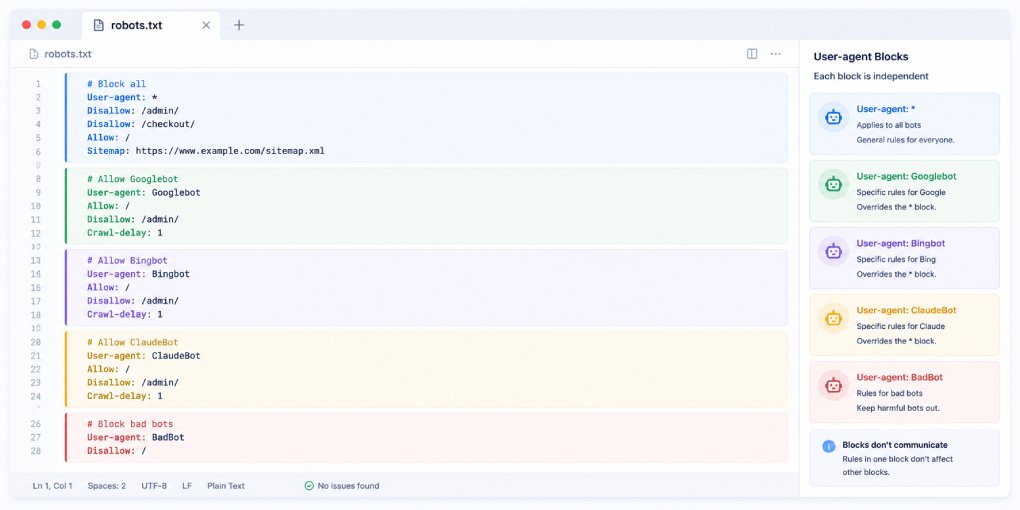
User-agent names the crawler a block applies to. Each block starts with one.
Disallow blocks a path. An empty value blocks nothing.
Allow permits a path, and is mainly used to carve exceptions out of a broader Disallow.
Sitemap points to your sitemap. It sits outside any user-agent block and applies globally.
A minimal complete file:
User-agent: *
Disallow:

Sitemap: https://yoursite.com/sitemap.xml
That allows everything and declares a sitemap. For many sites it is genuinely all that is needed.
Two wildcard characters are supported by the major crawlers. * matches any sequence of characters, and $ anchors to the end of a URL.
Disallow: /*?sort=        blocks any URL containing ?sort=
Disallow: /*.pdf$         blocks URLs ending in .pdf
Note that Disallow: /admin blocks /admin, /admin/, and /administrator alike, because matching is by prefix. Add the trailing slash when you mean the directory.
Which rule wins
This trips people up more than the syntax does, and getting it wrong is how sites accidentally block themselves.
A crawler obeys only one block. It looks for a block naming it specifically. If it finds one, it follows that block and ignores User-agent: * entirely. So this file does not do what it appears to do:
User-agent: *
Disallow: /private/

User-agent: GPTBot
Allow: /
GPTBot reads its own block, sees only Allow: /, and crawls /private/ freely. Rules from the wildcard block do not carry over. Anything that should apply to a named crawler must be repeated inside its own block.
Within a block, the most specific match wins. Longer paths beat shorter ones regardless of order:
User-agent: *
Disallow: /blog/
Allow: /blog/public/
/blog/public/ is allowed because that rule is more specific, even though the Disallow came first.
Working templates
Most sites. Allow everything, declare the sitemap, and stop:
User-agent: *
Disallow:

Sitemap: https://yoursite.com/sitemap.xml
Site with an admin area and internal search:
User-agent: *
Disallow: /admin/
Disallow: /cart/
Disallow: /*?s=
Allow: /

Sitemap: https://yoursite.com/sitemap.xml
Blocking internal search result pages matters more than it looks. They generate unlimited URL combinations and consume crawl budget that should go to real content.
Staging or development:
User-agent: *
Disallow: /
The one case where blocking everything is correct. Just make absolutely certain this file never reaches production, which is a mistake that happens often enough to be worth naming.
The AI crawler section
The main crawlers you may want to name, and what each one does:
- GPTBot, OpenAI, training data collection
- OAI-SearchBot, OpenAI, indexing for ChatGPT Search
- ChatGPT-User, OpenAI, fires when a user asks ChatGPT to visit a URL
- ClaudeBot, Anthropic
- PerplexityBot, Perplexity
- Google-Extended, Google, controls AI features and is separate from Googlebot
- Applebot-Extended, Apple Intelligence
- Bytespider, ByteDance
- Meta-ExternalAgent, Meta
The distinction that matters most: GPTBot is training, OAI-SearchBot is search visibility. Blocking GPTBot has no effect on whether you appear in ChatGPT Search. Blocking OAI-SearchBot removes you from it entirely. Sites that block “OpenAI” as a single decision usually give up more than they intended.
To allow everything, the empty wildcard block already covers it and you need nothing further. To opt out of training while keeping search visibility:
User-agent: GPTBot
Disallow: /

User-agent: OAI-SearchBot
Allow: /

User-agent: ChatGPT-User
Allow: /

User-agent: *
Disallow:

Sitemap: https://yoursite.com/sitemap.xml
For the reasoning behind allowing or blocking, this article covers the tradeoff. For crawler-by-crawler configuration detail, see here.
Deploy and verify
Upload the file to your domain root so it answers at yoursite.com/robots.txt. It must be at the root. A file in a subdirectory is never read.
Then check three things.
Open the URL in a browser and confirm it returns your file rather than a 404 or your site’s HTML.
Run it through the robots.txt tester in Google Search Console, which reports syntax errors and lets you test specific URLs against your rules.
And verify what actually happens, because robots.txt is only one of several layers that can stop a crawler. Firewall rules and bot management settings block without consulting it. How to test which AI crawlers can reach your site covers the difference between what your file permits and what your infrastructure allows.
Mistakes worth avoiding
Blocking CSS or JavaScript files. Rendering-capable crawlers need them to understand your layout, and blocking them degrades how your pages are interpreted.
Assuming rules cascade between blocks. The most common cause of accidental permissions.
Using robots.txt to hide sensitive content. The file is public. Listing /secret-admin/ in it advertises the path to anyone curious.
Forgetting the Sitemap line. It costs nothing and helps every crawler find your content efficiently.
Leaving a staging file live. Disallow: / shipped to production removes a site from search entirely, and the symptom often takes weeks to notice.
If you would rather not write it by hand, the robots.txt generator builds a valid file with each AI crawler toggled individually. Once deployed, run your site through hey-eye to confirm the configuration is read as intended.