Open your Search Console query report and sort by impressions. If your site covers anything AI-adjacent, look closely at the long queries. Somewhere in there you may find something that is not a search at all.
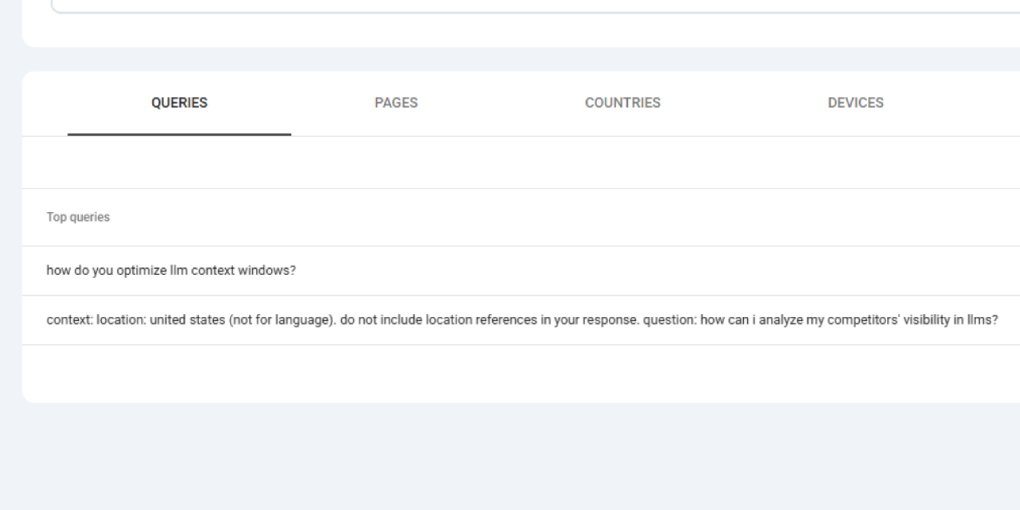
On one of my pages, this appeared as a query:
context: location: united states (not for language). do not include \nlocation references in your response. question: how can i analyze my competitors’ visibility in llms?
That is not something a person typed into a search box. It is a system prompt. The scaffolding an application wraps around a user’s question before sending it to a model. And it landed in my Search Console as an ordinary impression.
Once I saw one, I found more. Two other queries contained literal \n characters, the escape sequence for a newline, sitting in the middle of the text. You cannot type a newline into Google’s search bar. Something else generated these.
What you are actually looking at
These queries are machine-generated. Some system, somewhere, is taking a user’s question, wrapping it in instructions, and issuing it to Google as a search. The prompt scaffolding that should have stayed internal leaked into the query string, and Google logged it like any other search.
There are a few plausible sources, and from the data alone you usually cannot tell which:
AI Mode and AI Overview fan-out. When Google’s AI features answer a question, they generate multiple sub-queries behind the scenes and pull from many sources. Some of that machinery can surface in query reports as full, natural-language questions rather than the short fragments humans type.
Third-party agents and tools. AI visibility trackers, rank monitors, and research agents issue queries to Google programmatically. If one of them is poorly built, its internal prompt formatting can end up in the query itself. The leaked context: location: instruction has the fingerprint of exactly this.
LLM-powered browsing. Assistants that search the web on a user’s behalf construct queries from templates. When the template is malformed, the template leaks.
The honest position is that you are seeing machine traffic, and you often cannot identify the machine.
How to spot them in your own data
Three signatures, all easy to filter for:
Full sentences with question marks. Humans search in fragments: “llm competitor audit,” not “how can I analyze my competitors’ visibility in llms?” A query report full of complete, grammatical questions is a report full of machine queries.
The same question twice, with and without punctuation. On my page, one question appeared once with a question mark and once without, as two separate rows with different impression counts and different average positions. That split is a strong tell, because it usually means two different surfaces logged the same underlying query.
Literal \n, \t, or visible instruction words. Newline escapes, “context:”, “do not include”, “question:” and similar tokens do not belong in a human search. When they appear, you are looking at leaked scaffolding.
Filter your query report by page and read the long queries directly. The pattern jumps out once you know the shape of it.
What this does to your metrics
This is not a curiosity. It quietly corrupts the two numbers people trust most.
Average position becomes meaningless on affected pages. These machine queries often rank at position 2 or 3, because they match your content almost exactly. Blend that with the position 15 to 30 your human queries actually get, and the page reports a healthy average that describes neither group. On one of my pages, machine queries accounted for 64% of impressions, so the “average position” was mostly measuring traffic no human ever saw.
Click-through rate stops meaning what you think. You cannot fail to persuade someone who was never shown a clickable link. A page sitting at position 2 with hundreds of impressions and zero clicks is not a snippet problem. It is a page whose impressions are machine-generated. I spent weeks rewriting titles and meta descriptions on exactly these pages, assuming the copy was weak. It was not. Nobody was there to click.
The practical damage is that you optimize the wrong things. Every hour spent improving the snippet of a machine-dominated page is an hour wasted, and the “improvement” never moves the number because the number was never about humans.
What to do about it
You cannot stop these queries. They come from systems you do not control, and Google logs what it logs.
What you can do is stop letting them distort your decisions:
Separate human queries from machine queries before drawing conclusions. When you look at a page, mentally split the query list into fragments (human) and full sentences with prompt residue (machine). Judge CTR and position only on the human set.
Do not optimize snippets on machine-dominated pages. If most of a page’s impressions are machine queries, its snippet is irrelevant. Spend the effort on pages where humans actually appear, which for most sites are the ones ranking lower on execution-intent queries.
Cross-check against the Generative AI report. Google’s Generative AI features report shows impressions from AI surfaces, though in my experience it undercounts, attributing only a fraction of what the query patterns suggest. Use it as a floor, not a full accounting.
Treat “position 2, zero clicks” as a signal, not a failure. It almost always means the page is being surfaced to machines or AI features rather than to people. That is not necessarily bad, it can mean you are being used as a source, but it is not traffic and you should not model it as traffic.
The larger point
Search Console was built for a world where a query meant a person. That assumption is breaking. A growing share of what it logs comes from models, agents, and AI surfaces, and it presents all of it with the same interface as human search.
The leaked system prompt is just the most visible symptom. It is the one case where the machine forgot to hide. The rest of the machine traffic is there too, better disguised, quietly inflating your impressions and flattening your averages.
The skill worth building now is reading your own query report with suspicion. Ask of every surprising line: would a person actually type this? When the answer is no, you have learned something real about your data, even if you never find out which machine sent it.