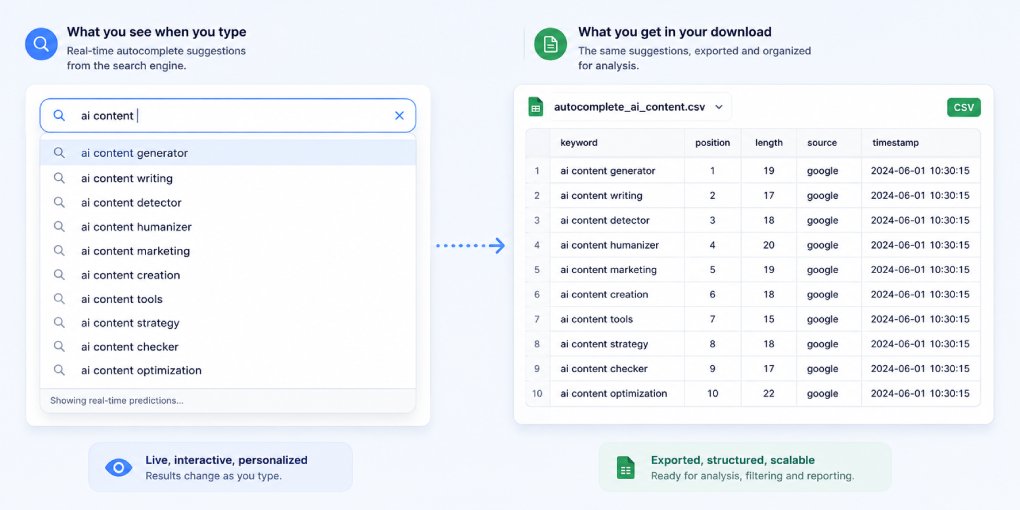
Every keyword tool is built on top of data you can pull yourself for free. Not all of it, but a genuinely useful slice: the exact suggestions Google shows when you start typing in the search bar, the ones that appear as autocomplete.
Those completions are real queries that real people type. And there is a public endpoint that returns them as a file, with no subscription, no login, and no tool in between.
Here is how it works and how to pull hundreds at a time.
The endpoint
When you type into Google and autocomplete kicks in, your browser is quietly calling an internal endpoint. You can call the same one directly:
https://suggestqueries.google.com/complete/search?client=chrome&q=your+queryReplace your+query with your term, using + instead of spaces. Paste it into a browser and it returns a JSON response containing the autocomplete suggestions for that term.
The number of suggestions varies by query, usually somewhere between ten and twenty. Every one of them is a real completion Google serves to actual users, not an estimate from a historical database.
A note before you rely on this: the endpoint is undocumented and unofficial. Google has never published it and could change or restrict it at any time. It works today and has for years, but build nothing mission-critical on top of it.
What the relevance number actually means
With client=chrome, each suggestion comes back with a relevance score, a number like 601, 801, or 1250.
It is tempting to read this as search volume or intent strength. It is neither. The relevance score is Google’s own internal ranking value, how strongly it ranks that one suggestion against the others for the same typed prefix. It orders the suggestions relative to each other. It does not tell you how many people search the term, and it does not measure momentum.
Treat it as “Google surfaces this one more prominently than that one,” and nothing more. A suggestion with 1250 is ranked above one with 601 for that prefix. That is the entire claim you can safely make. If you want actual volume, you still need a tool that licenses clickstream or ad data.
This distinction matters. Presenting a ranking score as a volume number is exactly the kind of overclaim that makes keyword data untrustworthy.
Targeting a country and language
Autocomplete is localized. What the endpoint returns depends on where Google thinks you are, so for any geo-specific work you should set it explicitly with hl for language and gl for country:
United States:
https://suggestqueries.google.com/complete/search?client=chrome&hl=en&gl=us&q=ai+visibility

United Kingdom:
https://suggestqueries.google.com/complete/search?client=chrome&hl=en-GB&gl=uk&q=ai+visibility
Run the same seed across a few country codes and compare. The differences tell you how demand for a topic shifts by market, which is useful if you serve more than one.
The alphabet method
A single call returns the top completions for your exact term. But you can expand the seed by appending each letter of the alphabet, and Google returns a fresh set for each one:
https://suggestqueries.google.com/complete/search?client=chrome&q=ai+visibility+a
https://suggestqueries.google.com/complete/search?client=chrome&q=ai+visibility+b
https://suggestqueries.google.com/complete/search?client=chrome&q=ai+visibility+c
ai visibility a surfaces completions like “ai visibility agency” or “ai visibility analysis”. ai visibility t surfaces “ai visibility tool” and “ai visibility tracker”. Sweep a to z and you go from fifteen suggestions to several hundred, covering the long tail that a single call never reaches.
You can extend the same idea with digits 0 to 9 and with question words like how, what, why, and can, which surface the question-shaped queries that matter most for AI visibility.
Do not do it by hand
Twenty-six letters, ten digits, and a handful of question prefixes across two or three countries is a lot of clicking. Don’t. Ask any LLM to write a short Python script that loops through the variants and dumps everything into one deduplicated CSV.
A minimal version looks like this:
import requests, csv, string, time

seed = "ai visibility"
rows = {}

for suffix in [""] + list(string.ascii_lowercase):
    q = (seed + " " + suffix).strip().replace(" ", "+")
    url = f"https://suggestqueries.google.com/complete/search?client=chrome&hl=en&gl=us&q={q}"
    try:
        data = requests.get(url, timeout=10).json()
        suggestions = data[1]
        scores = data[4].get("google:suggestrelevance", []) if len(data) > 4 else []
        for i, s in enumerate(suggestions):
            score = scores[i] if i < len(scores) else ""
            rows[s] = score
    except Exception:
        pass
    time.sleep(0.5)

with open("keywords.csv", "w", newline="", encoding="utf-8") as f:
    w = csv.writer(f)
    w.writerow(["keyword", "relevance"])
    for kw, score in sorted(rows.items(), key=lambda x: -(x[1] or 0)):
        w.writerow([kw, score])

print(f"{len(rows)} unique keywords saved")
The time.sleep matters. The endpoint tolerates normal use but will start refusing requests if you hammer it. Half a second between calls keeps you well within limits.
Once you have the CSV, paste it into any LLM and ask for a table grouped by intent, informational, commercial, navigational. That grouping is where the raw list turns into a content plan.
Where this fits
This gives you the raw material: what people actually type. What it does not give you is which of those queries are worth writing for, or whether your existing pages already answer them.
That is the next step, and it is what our Questions People Are Asking tool automates. It pulls real questions from Google Suggest and Reddit for any topic, ranks them by relevance, and hands you a curated list without the scripting. If you would rather understand the manual method first, this article walks through finding questions people ask across several sources.
The keywords are sitting in a public endpoint right now. You just need to pull them, and read the relevance number for what it actually is.