I connected bot analytics to hey-eye expecting to finally see the AI crawlers.
GPTBot indexing pages. Claude reading articles. Perplexity pulling citations.
Then I looked at the data.
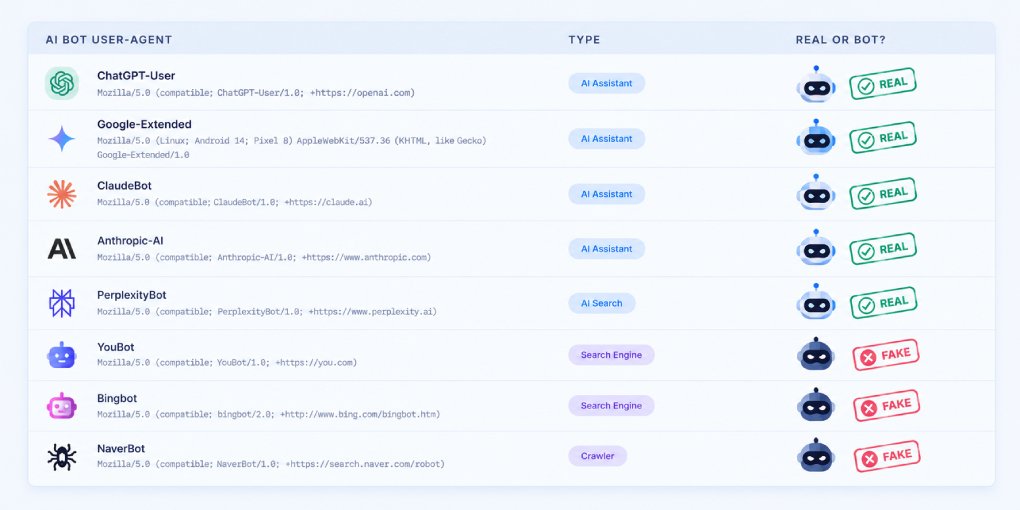
98% of the traffic wearing an OpenAI, Anthropic, or Perplexity user-agent was fake.
Not “some of it.” Almost all of it.
If you are measuring AI visibility from your server logs, this is the first thing nobody tells you. Here is how to separate the real crawlers from the costumes.
The user-agent proves nothing
A user-agent is just a text header.
Anyone can set it to anything. One line in a script and your scraper announces itself as Claude-User or GPTBot.
There is no signature. No token. No handshake.
So when your log shows “GPTBot visited 100 times,” that is not a fact about OpenAI. It is a fact about what some bot typed into a header.
Most GEO guides tell you to count AI crawler hits in your logs. Counting the raw user-agent is counting fiction.
What my own data looked like
Two weeks. Every request that hit the site, classified as verified or spoofed.
Here is the share that turned out fake, per identity:
| User-agent claimed | Share that was fake |
|---|---|
| Claude-User | 100% |
| ChatGPT-User | 100% |
| Perplexity (bot and user) | 100% |
| Google-Extended | 100% |
| Meta-ExternalAgent | 100% |
| ClaudeBot | 100% |
| GPTBot | 94% |
| OAI-SearchBot | 90% |
Across all of it, roughly two out of three bot visits to the site were spoofed.
The genuine AI crawlers were a rounding error. Under 10% of total traffic came from verified AI bots, and almost all of that was a single one (Amazonbot).
If I had trusted the user-agent, I would have written a triumphant post about how OpenAI and Anthropic can’t stop reading my content.
They basically weren’t there.
How verification actually works
A real crawler is not proven by what it says. It is proven by where it comes from.
Two methods, depending on the operator:
Reverse DNS, then forward-confirm.
Take the IP. Do a reverse DNS lookup. Check the hostname ends in the operator’s domain (googlebot.com, search.msn.com). Then forward-resolve that hostname back and confirm it matches the original IP. Google and Bing both work this way.
Published IP ranges. OpenAI, Anthropic, Perplexity, and others publish the exact IP blocks their bots use, as JSON files you can fetch and check against. If the request did not come from a listed IP, the user-agent is a lie, full stop.
The logic is the same either way:
Claimed identity, then real network origin, then match or discard.
If you are on Cloudflare, you get this for free. Its verified-bot signal has already done the reverse DNS and IP checks for you, which is exactly why my dashboard could label two thirds of the traffic as spoofed instead of waving it through.
The bigger tell: watch what they do, not what they say
Even before verification, the fake bots gave themselves away by behavior.
Over 70% of all bot traffic went to attack paths.
Not articles. Not the homepage. Not robots.txt.
They went hunting for secrets:
/.env and every variant of it.
/.git/config, /.git/HEAD.
/.aws/credentials, /id_rsa, /key.json, /service_account.json, /firebase.json.
/graphql, /admin, /login, /actuator/env.
Meanwhile under 2% of the traffic touched a real content page.
No genuine AI crawler behaves like that. GPTBot does not need your AWS credentials to summarize a blog post.
This is the giveaway. If something calls itself an AI assistant and immediately reaches for /.env, it is not an AI assistant.
They are now hunting for AI keys specifically
This was the part I did not expect.
Buried in the attack paths were requests for:
/@fs/root/.claude/settings.json
/@fs/root/.openai/config.json
The /@fs/ prefix targets a known dev-server path-traversal exploit. The filenames target your AI credentials.
Scanners have updated their wordlists. They are no longer just after database passwords and cloud keys. They are specifically probing for leaked Claude and OpenAI configuration, because a stolen AI API key is now a resellable asset.
If you run any tooling that writes those files, that is your new thing to keep off a public path.
The measurement trap that almost fooled me
One more lesson, and it is a measurement one.
Every single request in my dataset returned a redirect. Zero of them returned a real page.
That is not because the site was down. It is because the analytics was watching the www hostname, which redirects to the canonical one. I was measuring the doormat, not the room.
The takeaway generalizes:
Before you trust any bot report, confirm which exact hostname it sits on.
If your analytics is on a redirecting host, you are seeing who knocks, not what they read. Point it at the canonical hostname or you will draw content conclusions from a dataset that never served any content.
What to actually do
Verify before you count. Never report a raw user-agent number as AI visibility. Segment verified-only, or the metric is meaningless.
Separate the two questions. “Are AI crawlers reaching my content?” and “How much bot noise am I getting?” are different. Answer them with different, filtered views.
Block the spoofers. A single WAF rule can drop requests whose user-agent claims a known bot but fails verification. It cleans your data and cuts wasted requests at the same time.
Harden the obvious paths.
Return a hard block on /.env*, /.git/*, /.aws/*, /@fs/*, and dynamic-language files on a static site. There is no legitimate reason for those to resolve.
The uncomfortable summary: most “AI crawler traffic” in a raw log is not AI, and not even crawling. It is scanners in costume, looking for a way in.
Verify the origin, and the real picture, usually a much smaller and calmer one, finally shows up.
Want to know whether the real AI crawlers can even reach your content? Test your AI crawler access and see which bots are allowed, blocked, or getting redirected before they ever read a word. For the difference between what your robots.txt permits and what your infrastructure actually allows, see how to test which AI crawlers can reach your site.
FAQ
Can I trust the user-agent to identify an AI crawler? No. The user-agent is a free-text header that anyone can set. It tells you what a bot claims to be, not what it is. Only the network origin (verified IP or reverse DNS) proves identity.
How do I verify a real AI crawler? Two ways. For Google and Bing, do a reverse DNS lookup on the IP and forward-confirm the hostname. For OpenAI, Anthropic, and Perplexity, check the request IP against the published IP ranges each operator releases. If it fails, the bot is spoofed.
Why would a bot pretend to be GPTBot or Claude? To look legitimate and slip past naive blocklists. Many site owners allow known AI crawlers by user-agent, so impersonating one is an easy way to avoid being filtered while scanning for vulnerabilities.
Is spoofed bot traffic dangerous? The traffic itself is mostly vulnerability scanning, probing for exposed secrets and misconfigurations. It is harmless as long as those paths do not exist or do not resolve. The real risk is a genuine leak the scanner finds first.
Does Cloudflare verify bots automatically? Yes. Cloudflare’s verified-bot detection performs the reverse DNS and IP checks and flags requests that fail as spoofed, which lets you segment or block them without building the verification yourself.