There is a difference between permitting a crawler and being reachable by it.
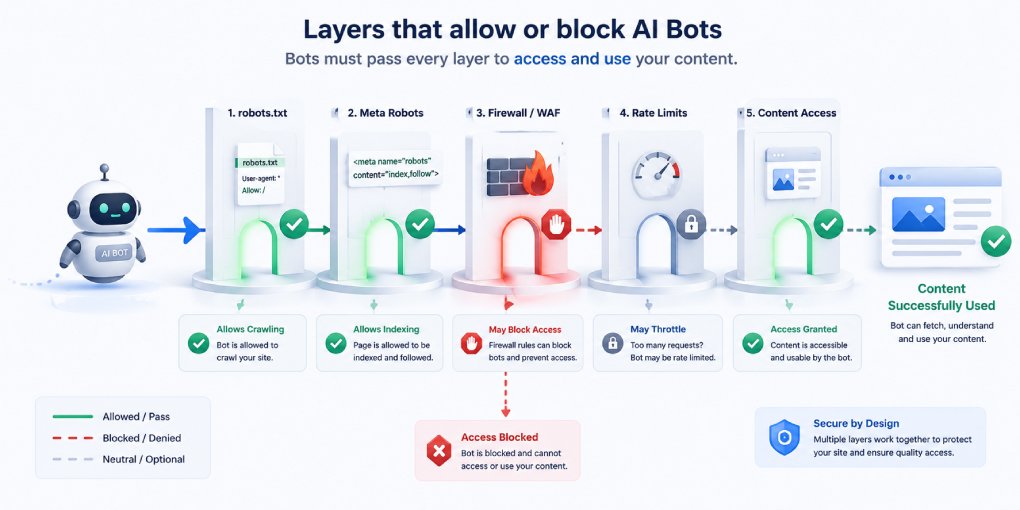
Your robots.txt is a request. It sits at your domain root and politely tells well-behaved bots what they may fetch. But between the crawler and your content sit several other layers that answer with something more final than a request: a firewall rule, a bot management setting, a rate limiter, a CDN default. None of them read your robots.txt. All of them can return a 403 before your server ever sees the request.
Most site owners never discover this, because a blocked crawler leaves no trace in their analytics. It simply stops coming.
Why this matters more now
Cloudflare announced on July 1, 2026 that its default settings are changing. From September 15, 2026, crawlers that blend multiple purposes get blocked by default on pages that display advertising.
The new model splits AI crawlers into three categories:
- Search crawlers fetch your content to index it and answer questions about it later. These remain allowed by default.
- Agent crawlers act in real time on behalf of a user trying to accomplish something.
- Training crawlers collect content to train models.
The latter two are blocked by default on ad-carrying pages. The new defaults apply to new Cloudflare customers, new sites added by existing customers, and all existing free-tier customers. Site owners can change the setting in the dashboard.
Two things follow from this. If your site carries ads and sits on Cloudflare’s free tier, your access posture may change in September without you touching anything. And more generally, infrastructure-level crawler controls are becoming the norm rather than the exception, which means robots.txt alone no longer describes who can reach you.
The layers that can block a crawler
Working outward from your content, any of these can stop a bot:
robots.txt. The only layer you probably audit. A Disallow here stops well-behaved crawlers voluntarily.
Bot management and WAF rules. Cloudflare Bot Fight Mode, security rules, and managed challenges evaluate requests by user agent, IP range, ASN, and behavioral fingerprint. These enforce rather than request. A crawler blocked here gets a 403 or a challenge page it cannot solve.
CDN and platform defaults. Settings you never configured, applied by your provider on your behalf. This is the category most likely to surprise you, because nothing in your own configuration changed.
Rate limiting. Crawlers make many requests quickly. A rate limit tuned for human traffic can throttle a legitimate crawl into failure.
Geographic restrictions. Blocking traffic from regions where crawler infrastructure happens to run will block those crawlers.
Authentication walls. Content behind a login is invisible regardless of every other setting.
JavaScript dependency. Not technically a block, but functionally identical. If your content requires client-side rendering, most AI crawlers receive an empty page even with full access granted.
How to test actual access
Two methods, and you need both because each catches what the other misses.
Method 1: request simulation. Send a request using a crawler’s user agent string and check the response code:
curl -s -o /dev/null -w "%{http_code}\n" \
  -A "Mozilla/5.0 AppleWebKit/537.36 (compatible; GPTBot/1.0; +https://openai.com/gptbot)" \
  https://yoursite.com/
Repeat for OAI-SearchBot, ClaudeBot, PerplexityBot, Google-Extended, and any other crawler you care about.
A 200 means the user-agent string alone is not being blocked. A 403 means something in your stack is rejecting that agent by name. A 429 means rate limiting. A challenge page returned with a 200 status is a soft block that a crawler cannot pass.
The limitation is important: this only tests user-agent-based rules. If your firewall blocks by IP range or ASN, you will get a 200 from your own machine while the real crawler gets rejected. Request simulation proves a block exists, but it cannot prove one does not.
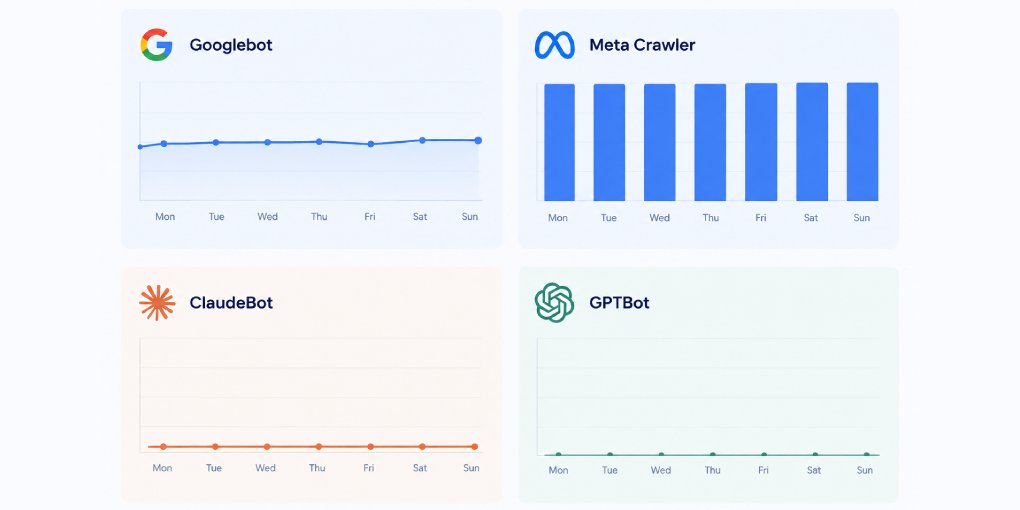
Method 2: log verification. Check whether the crawlers are actually arriving. In your server logs or Cloudflare analytics, search for each crawler’s user agent over the past 30 days.
grep -icE "gptbot|oai-searchbot|claudebot|perplexitybot|google-extended" access.logA crawler that appears regularly is definitely reaching you. A crawler that appears zero times over thirty days, when others appear daily, is either blocked or has decided your site is not worth revisiting. Either way it is worth investigating.
Method 1 tells you what your configuration says. Method 2 tells you what is actually happening. When they disagree, trust Method 2.
Reading the results
All crawlers arriving regularly. Nothing to fix. Recheck after any infrastructure change, and again after September 15 if you are on Cloudflare.
Some crawlers arriving, others absent. Selective blocking somewhere in your stack. Check bot management rules first, since these are the most common cause and the least likely to be documented anywhere you would look.
No AI crawlers at all. Either a blanket block or your site has not been discovered. Check robots.txt and firewall rules first. If both are clean, the problem is discoverability: submit your sitemap, add an llms.txt file, and check your internal linking.
Crawlers arriving but citations not appearing. Access is fine and the problem is downstream. The crawlers reach your content but find it hard to extract. Run the pages through hey-eye and look at the AI Extractability pillar.
Automate the check
Testing each crawler manually across multiple pages takes time and has to be repeated after every infrastructure change. The hey-eye AI Crawler Tester runs the checks for every major AI crawler and reports which ones can reach your content and which are blocked, along with the likely cause.
If you find blocks you did not intend, the robots.txt generator handles the robots layer. The firewall and bot management layers you will need to fix in your provider’s dashboard, since no external tool can change those for you.
Put a date in your calendar
If your site runs on Cloudflare, particularly on the free tier, test your crawler access before September 15 and again a week after. Defaults you never chose can change what reaches you, and the only way to know is to check.
The crawlers will not tell you they were turned away. They will just stop showing up.