Auditing one page tells you about one page. Auditing your site tells you about your templates, your publishing habits, and the systematic gaps that no single-page scan will ever surface.
This is the procedure. If you want the background on what an extractability audit measures and why it matters, start here. This article assumes you already know and want to run one.
Budget about two hours for a site under 100 pages, most of it unattended.
Before you start
You need three things.
An accessible sitemap at yoursite.com/sitemap.xml or sitemap-index.xml. If you do not have one, generate it first. The audit crawls what the sitemap declares, so an incomplete sitemap produces an incomplete audit.
A list of your top 20 pages by traffic, pulled from Search Console or your analytics. You will need this in step two, and pulling it now saves interrupting yourself later.
A place to record results. A spreadsheet is enough. You are going to compare these numbers against a future run, and unrecorded baselines are the most common reason audits get run twice and learned from never.
Step 1: Crawl and score everything
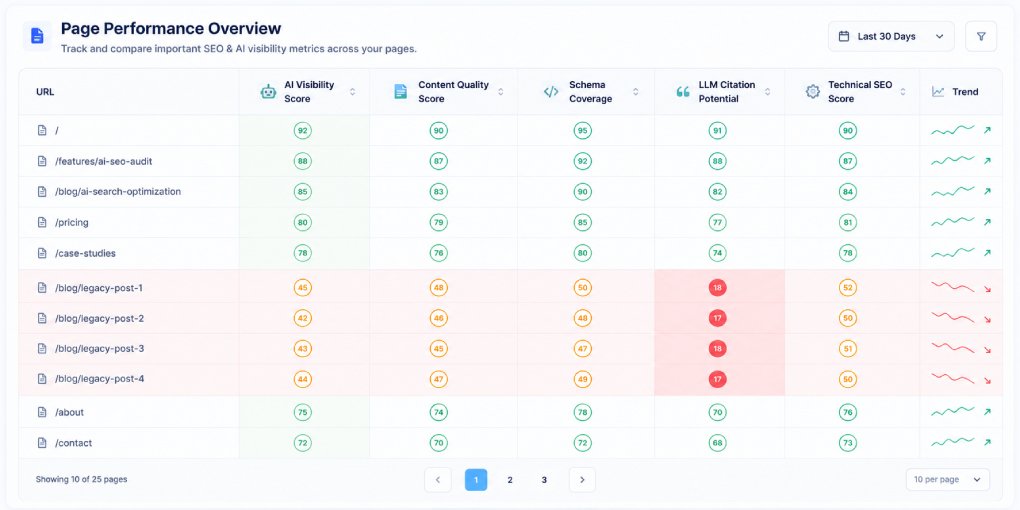
Run your domain through the website audit. It discovers your sitemap, fetches every URL it declares, and scores each one across the four pillars.
While it runs, note two things about the crawl itself. How many pages did it find compared to how many you believe you have? A large gap means orphan pages that are absent from your sitemap, which are invisible to AI crawlers for the same reason they are invisible to the audit. And did any pages fail to fetch? A timeout or error response is a more serious problem than a low score, because it means the content is unreachable rather than merely unoptimized.
Step 2: Triage by importance, not by score
The instinct is to sort by lowest score and start there. Resist it.
Your worst-scoring page might be a terms-of-service page nobody reads. Fixing it improves an average and changes nothing real.
Instead, cross-reference the audit results against your top 20 pages by traffic. A page with meaningful traffic and a score below 60 is your highest priority, because the audience already exists and the structure is failing them. A page with no traffic and a score of 30 can wait.
Sort your working list by traffic first, then by score within that.
Step 3: Find patterns, not failures
This is the step that separates a site audit from twenty page audits, and the one most people skip.
Before fixing anything, scan down the pillar columns and ask three questions.
Does one pillar fail consistently across many pages? If forty pages all score low on AI Extractability while scoring fine elsewhere, you do not have forty problems. You have one problem appearing forty times, and it is almost certainly missing or incomplete schema.
Do pages of the same type score similarly? Group by template: blog posts, product pages, landing pages, category pages. If every page built from one template scores within a few points of the others, the template is the unit to fix, not the pages.
Did scores change by publication date? If everything published before a certain month scores lower, something changed in your process. Either you improved your standards and older content never caught up, or a platform update silently altered output.
Write down the patterns you find. These become your fix list.
Step 4: Separate template fixes from page fixes
Now split your findings into two buckets.
Template-level issues affect every page using that template. Missing JSON-LD, absent canonical tags, incomplete Open Graph markup, missing author attribution, broken heading hierarchy caused by the theme. One change fixes all of them at once. These have by far the best return on effort.
Page-level issues live in the content itself. Paragraphs that run long, sections without subheadings, missing definitions, thin content. These have to be fixed one page at a time.
Do every template fix before you touch a single page. It is common for a template fix to move dozens of pages up by ten or more points in an afternoon, which changes your priority order for everything that follows.
Step 5: Fix in dependency order
Within your list, the order matters because some fixes make others possible.
Access first. If a page cannot be fetched, or AI crawlers are blocked, nothing else counts. Verify robots.txt and crawlability before anything.
Structure second. Title tags, heading hierarchy, canonical URLs, language attributes. These determine whether the page can be parsed at all.
Schema third. With structure clean, add or complete the JSON-LD. This is usually the single largest score movement available.
Content last. Paragraph length, definitions, internal links. Real gains, but they only pay off once the layers underneath are sound.
Step 6: Re-scan and record
After each batch of fixes, re-run the affected pages and record the new scores next to the old ones.
This matters for two reasons beyond satisfaction. It confirms the fix worked, since assumptions about what improves a score are wrong more often than you would expect. And it catches regressions, because changes intended to fix one pillar occasionally damage another.
Store the results in Scan History so the trend survives past your spreadsheet.
What you will probably find
Across most sites, the same handful of issues account for the bulk of lost points.
Schema missing entirely on older content, present on newer content, because the plugin or template was added partway through the site’s life.
Author and date fields absent from schema on non-blog pages. Landing pages and resource pages routinely omit them even when blog posts include them, and the fix is copying the existing block.
Paragraph length creeping up in content written under time pressure. Compare your most recent ten posts against your best-scoring ten and the difference is usually visible immediately.
Pages that exist but are absent from the sitemap, and therefore from both the audit and the crawlers.
Cadence
Run the full audit monthly if you publish regularly, quarterly if you do not. Run it immediately after any template change, CMS update, or migration, since those are when systematic regressions get introduced.
For individual pages between audits, a single scan through hey-eye takes seconds and is worth doing on anything you publish before you consider it finished.
The audit is not the work. The audit tells you which work is worth doing.