Before a retrieval system can find anything on your page, it has to cut the page into pieces. That cutting step happens once, at ingestion, and every retrieval afterwards is limited by how well it went.
If the splitter cut your content in the wrong places, no amount of embedding quality or reranking recovers the meaning that was lost at the boundary. Your headings are what tell it where to cut.
This is the mechanical layer underneath how heading structure affects extractability. That article covers what headings do for AI visibility. This one covers what happens inside the pipeline.
Three ways a document gets split
RAG implementations use one of three broad strategies, and the difference matters for how much your markup influences the outcome.
Fixed-size splitting cuts every N tokens with some overlap. Simple, fast, and structurally blind. It will cheerfully cut a sentence in half and split a definition from the term it defines. Your HTML is irrelevant here.
Recursive character splitting tries a hierarchy of separators in order, usually paragraph breaks first, then line breaks, then sentences, falling back to character counts only when a chunk is still too large. Better, and your paragraph structure now matters, but the splitter still has no concept of sections.
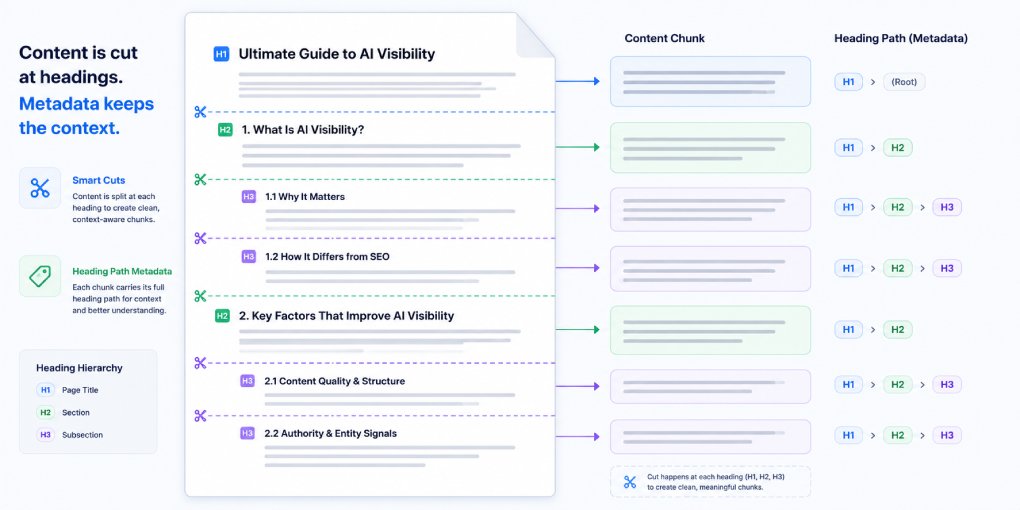
Structure-aware splitting uses the document’s own markup to find boundaries. For HTML this means splitting on heading tags. LangChain’s HTMLHeaderTextSplitter and the equivalents in other frameworks take a list of heading levels and cut the document at each one.
The third approach is increasingly the default for web content, because it produces chunks that correspond to actual sections rather than arbitrary windows. And it is entirely dependent on your heading markup being correct.
What a header splitter does with your headings
Two things, and the second is the one people miss.
It cuts at each heading, so every H2 and H3 becomes a boundary between chunks. And it attaches the heading path as metadata to the chunk that follows.
So a chunk of text under H1: AI Visibility then H2: Structured Data then H3: FAQ Schema arrives in the vector store carrying all three headings as metadata. When that chunk is later retrieved, the system knows not just the text but where in your document it came from.
That metadata does real work. It improves retrieval precision, because the heading path contributes signal beyond the chunk text itself. It preserves context, because a chunk that says “this reduces extraction ambiguity” is nearly meaningless alone but interpretable when it carries the heading path that names what “this” is. And it enables attribution, because the system can cite a specific section rather than a whole page.
A page with no headings produces one enormous chunk with no metadata, or gets handed to the fallback splitter and cut arbitrarily. Either way you lose.
What breaks it
Skipped levels. An H2 followed directly by an H4 creates a hierarchy the splitter cannot resolve. Depending on the implementation, the H4 content either gets attributed to the wrong parent or the metadata path comes back incomplete. Never skip a level, even when the H4 happens to be the size you want visually.
Headings chosen for appearance. A designer picks H4 because it renders at the right size, or wraps a section title in a styled div instead of a heading tag. Both are invisible to a structure-aware splitter. The section boundary simply does not exist, and two unrelated topics merge into one chunk.
Multiple H1 tags. Many templates put the site name in an H1 in the header and the page title in another H1 in the content. The splitter now sees two document roots and the metadata path becomes ambiguous for everything that follows.
Content stranded before the first heading. Text between the H1 and the first H2 belongs to no section. Some splitters drop it, others attach it to the document root with minimal metadata. If your opening paragraph contains your clearest definition, which it often should, this is a real loss.
Boilerplate inside the content tree. Navigation, cookie banners, related-post widgets, and footers that sit inside your article element get chunked along with your content. Semantic elements are what let an extractor strip these first: article marks the content, nav and aside and footer mark what to discard. Generic divs give it nothing to work with, so the boilerplate ends up in your chunks, diluting every embedding it touches.
Rules that survive contact with real pipelines
One H1 per page, in the content, describing the page topic.
H2 for each section that could stand alone as an answer to a question. This is the level most splitters cut at by default, so it is the level that determines your chunk granularity.
H3 only for subdivisions that genuinely belong under their H2. Never as a size choice.
Wrap the main content in article and put navigation, sidebars, and related-content blocks in nav and aside outside it.
Keep each section long enough to be substantive and short enough to fit a chunk. Sections beyond roughly 500 words risk being split again by a size-based fallback, at which point you are back to arbitrary boundaries within your own section. The paragraph structure inside those sections determines where those secondary cuts land.
Put your definitions immediately after the heading they belong to, not several paragraphs down. The top of a chunk is its most reliably retrieved part.
Seeing your own chunks
You do not need to guess. Read only your headings, top to bottom, and treat each H2 as the start of a chunk. Ask whether each resulting block makes sense in isolation, carrying only its heading path as context.
Where the answer is no, that is a chunk a retrieval system will fetch and struggle to use. Usually the fix is either a missing heading or a definition that lives in the wrong section.
To check the structural signals across a whole page, run it through hey-eye and look at Structural Integrity for hierarchy problems and AI Extractability for whether the resulting sections are actually usable.
Headings are not formatting. In a retrieval pipeline they are the instruction set for how your document gets taken apart.