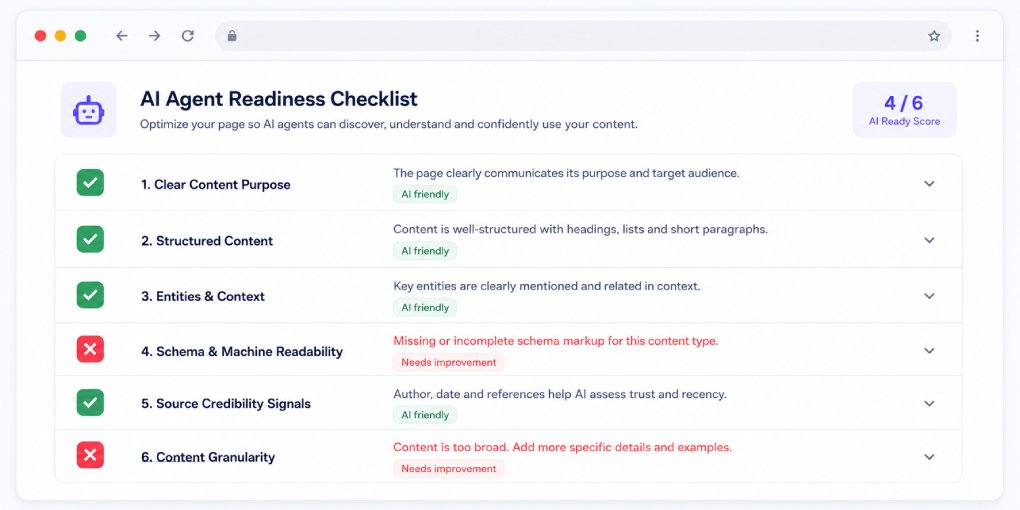
Most sites fail agent readiness without knowing it. Not because of anything complicated, but because nobody ever checked.
These six tests take about ten minutes total. You can run all of them from your browser and your address bar. Each one tells you exactly what an AI agent experiences when it lands on your site, what a pass looks like, and what to do if you fail.
If you want the background first, what AI agent readiness means and why it matters covers the concepts. This article skips the theory and goes straight to the tests.
Test 1: Can agents read your page at all?
What to do: Open your homepage in Chrome. Press F12 to open DevTools, then Ctrl+Shift+P (Cmd+Shift+P on Mac). Type “Disable JavaScript” and hit Enter. Reload the page.
Pass: Your headline, body content, prices, and navigation are all still visible.
Fail: The page is blank, shows a loading spinner, or displays only a header with empty content areas.
Why it matters: Most AI crawlers do not execute JavaScript. GPTBot, ClaudeBot, PerplexityBot, and OAI-SearchBot all read your raw HTML and stop there. Whatever you see with JavaScript disabled is the entire universe of content those agents have access to.
If you fail: Your content needs server-side rendering or static generation. This is the most expensive fix on this list, but also the most important, because every other optimization is worthless if the content isn’t there. See how JavaScript rendering affects AI visibility for the full breakdown of solutions.
Test 2: Are AI crawlers allowed in?
What to do: Visit yoursite.com/robots.txt in your browser.
Pass: You see either no mention of AI bots (which means default allow), or explicit Allow: / directives for GPTBot, OAI-SearchBot, ClaudeBot, PerplexityBot, and Google-Extended.
Fail: You see Disallow: / under any AI bot user-agent, or a blanket User-agent: * / Disallow: / with no exceptions.
Why it matters: This is a binary gate. A blocked crawler never sees your content, never indexes it, and never cites it. Your schema, your structure, and your writing quality become irrelevant.
If you fail: Many site owners discover their CMS, hosting provider, or a security plugin added AI bot blocks without telling them. Generate a correct file with the robots.txt generator and deploy it. Changes take roughly 24 hours to register with most crawlers.
Test 3: Does your page describe itself?
What to do: On any content page, right-click and select View Source. Use Ctrl+F to search for application/ld+json.
Pass: You find at least one JSON-LD block containing a schema type that matches your content (Article, BlogPosting, Product, FAQPage).
Fail: No results, or a schema block with placeholder values like “Author Name” or “example.com”.
Why it matters: JSON-LD is the first thing an agent processes. It tells the agent what type of content this is, who created it, and when, before a single paragraph of body text gets parsed. Pages without it force agents to infer everything from raw HTML, which is slower and less reliable than reading a structured block.
If you fail: Add schema to your most important pages first. The JSON-LD generator produces ready-to-paste blocks, and this guide covers which schema type to use for which content.
Test 4: Do you have a site manifest?
What to do: Visit yoursite.com/llms.txt.
Pass: You see a markdown file with your site name, a short description, and a curated list of key pages.
Fail: 404.
Why it matters: Without llms.txt, an agent arriving at your site has to crawl and infer what you do and which pages matter. With it, the agent gets a structured overview in one request. Google now includes an llms.txt audit in Lighthouse under its agentic browsing category, which means this check is about to become visible to every developer who runs a Lighthouse report.
If you fail: Generate one with the llms.txt generator and upload it to your domain root. Five minutes of work.
Test 5: Can agents discover what your site can do?
What to do: Visit these three URLs:
yoursite.com/.well-known/mcp.jsonyoursite.com/.well-known/agent-skills/index.jsonyoursite.com/.well-known/webmcp.json
Pass: At least one returns a valid JSON file.
Fail: All three return 404.
Why it matters: These files move you from readable to actionable. An agent that reads your page knows what you offer. An agent that reads your MCP Server Card or Agent Skills Index knows what it can actually do on your site: search your catalog, check availability, submit a form. This is the difference between being a source of information and being a service an agent can use.
If you fail: This is the newest layer and where almost every site currently fails, which makes it the biggest available differentiator. Start with the MCP Server Card since it has the widest support.
Test 6: Can agents get clean text instead of HTML?
What to do: In your browser console (F12, Console tab), run:
fetch(location.href, { headers: { 'Accept': 'text/markdown' } })
  .then(r => console.log(r.headers.get('content-type')));
Pass: The response content type is text/markdown.
Fail: It returns text/html.
Why it matters: When an agent requests markdown and gets it, it receives your content stripped of navigation, ads, scripts, and layout markup. Clean, structured text that costs far less context to process. When it gets HTML instead, the agent has to parse and clean the page itself, which introduces errors and wastes context window space.
If you fail: On Cloudflare, this can be handled with a Transform Rule that serves a pre-generated markdown version when the Accept header requests it. Static site generators can produce those markdown files at build time. This is a nice-to-have rather than a blocker, but it is a strong signal that your site was built with agents in mind.
Scoring yourself
5-6 passes: You are ahead of the overwhelming majority of sites. Focus on maintaining consistency as you publish new content.
3-4 passes: Solid foundations with specific gaps. Fix the failures in the order they appear above, since each test builds on the previous one.
0-2 passes: Agents are likely skipping your site entirely. Start with Test 1 and Test 2. Nothing else matters until content is accessible and crawlers are allowed.
Automate the check
Running these tests manually works for one page. To check them across your whole site, run your domain through hey-eye. The Agent Readiness panel performs all of these checks automatically and includes a Fix with AI button on each failure that generates implementation instructions for your specific site.
For a broader view, a website audit applies the same checks across every page in your sitemap, so you can find which sections of your site are agent ready and which are invisible.
Ten minutes of testing today tells you whether your site participates in agentic discovery or sits it out.